blogging tips

  • How to Start a Blog From Scratch in 2026 (Step-by-Step for Beginners)

    Starting a blog can feel overwhelming, especially if you’ve never done it before and aren’t sure where to begin. If you’re wondering how to start a blog from scratch in 2026, you’re not alone. With so many platforms, tools, and opinions available, it’s easy to get stuck before you even publish your first post.

    I’ve got good news! Blogging is still one of the most accessible ways to build an online presence, share your expertise, and create an income stream. You don’t need to be tech-savvy, have a large following, or spend months planning. What you do need is a clear, beginner-friendly roadmap that walks you through each step without the confusion.
    In this step-by-step guide, you’ll learn exactly how to start a blog from scratch, even if you have no prior experience. We’ll cover what’s changed about blogging in 2026, the essential tools you actually need, and the foundational steps that set your blog up for long-term growth—so you can move forward with confidence and clarity.

    how to start a blog from scratch; work from home; freelancing gigs; woman sitting in floor working on laptop; beginner blogging guide; start a blog step by step; start a blog for beginners how to create a blog

    What is a Blog?

    If you’re new to blogging, it helps to understand what a blog really is. A blog is a website where you post written content on a regular basis. In 2026, blogs are not just online journals. They are places where people share ideas, teach others, and build trust with readers over time.

    Many beginners think they need to be great writers, tech experts, or have a large audience before they start a blog. Not true. You don’t need special skills or experience to begin. If you can explain something you know, share a story, or help someone solve a problem, you already have enough to start.

    Starting a blog “from scratch” does not mean doing everything at once. It means picking one main topic, setting up a simple website, and adding content as you go. You don’t need a perfect design or dozens of posts right away. What matters most is getting started and staying consistent.

    Blogging is a good choice for beginners because it is flexible. You can blog as a hobby, to support a business, or to earn extra income over time. You can work at your own pace and grow your blog step by step.

    If you’ve been waiting until you feel ready, now is a good time to start. Every blogger begins as a beginner. The best way to learn blogging is by starting and learning as you go.

    Blogging for Beginners in 2026: What’s Changed

    When I started blogging many years ago, it was more as a hobby. It was fun to write about things I was doing, like keeping a journal. But as my little blog grew, I learned that blogging has changed a lot over the years. However, the main idea is still the same: helpful content wins. In 2026, blogs are less about posting often and more about creating content that answers real questions and solves real problems. Readers expect clear, useful information, and search engines reward blogs that deliver it.

    AI now plays a bigger role in blogging, especially for research, outlines, and editing support. However, AI does not replace original ideas or personal experience. Search engines are focused on search intent, which means they care more about how well your content matches what someone is actually looking for—not just which keywords you use. Good SEO today is about clarity, structure, and usefulness.

    Long-form content still matters because it allows you to cover a topic fully in one place. Well-written, in-depth posts tend to rank better, build trust with readers, and keep people on your site longer. One strong, helpful post can outperform several short, rushed ones.

    For beginners, the focus should be simple: choose one clear topic, write helpful posts, and learn the basics of SEO without overthinking it. You do not need to master every tool or trend. Start with quality content, consistency, and a willingness to improve as you go.

    How to Start a Blog from Scratch Step by Step

    Learning how to start a blog from scratch is easier when you break the process into simple steps. Don’t try to do everything at once. It will cause you to become overwhelmed, stressed, and burned out, which is why a lot of bloggers quit in the very beginning. This section walks you through each part in order, from choosing your topic to setting up your site.

    Step 1 – Choose a Blog Niche

    A blog niche is the main topic your blog focuses on. Instead of writing about everything, you choose one general area so readers and search engines know what your blog is about. A clear niche makes it easier to attract the right audience and decide what to write about.

    Beginner-friendly niche examples include:

    • personal finance basics
    • simple home organization
    • beginner fitness
    • easy recipes
    • parenting tips
    • homesteading
    • faith-based encouragement
    • learning a new skill

    The best niches are ones you’re interested in and can write about consistently, even as you continue learning.

    A common mistake beginners make is choosing a niche that is too broad, like “lifestyle” or “everything I’m interested in.” Another mistake is picking a niche only because it seems profitable, without any real interest in the topic. Focus on clarity, not perfection. You can always narrow your niche as your blog grows.

    Step 2 – Choose the Right Blogging Platform

    A blogging platform is the tool you use to create and manage your blog. Some popular options for beginners include WordPress, Wix, Squarespace, and Blogger. Each has its pros and cons, but the right platform depends on your goals, budget, and technical comfort level.

    WordPress is the most popular choice for beginners who want flexibility and long-term growth. It’s easy to use, works with many themes and plugins, and gives you control over your blog as it grows. You don’t need to be a developer to get started, and there are plenty of tutorials to guide you. (It’s what I use for all my blogs and have been using for years.)

    You can start with a free platform, which is easy and low-risk, but free blogs often come with limitations, like restricted design options, ads, and less control over your domain. A self-hosted blog (like WordPress.org) costs a little more, but it gives you full control, a professional domain name, and more opportunities to grow and monetize your blog.

    For beginners, starting with a self-hosted WordPress blog is usually the best long-term choice.

    Step 3 – Pick a Domain Name

    Your domain name is your blog’s address on the web, like http://www.yourblogname.com. It’s one of the first things readers notice, so choosing the right one matters. A good domain is easy to remember, easy to spell, and reflects your blog’s focus.

    When picking a domain, think about branding versus keywords. A brandable name is unique, catchy, and helps you stand out, while a keyword-focused name tells people (and search engines) exactly what your blog is about. You can combine both, but avoid long, confusing names.

    Common mistakes include:

    • using numbers
    • using hyphens
    • using complicated words that are hard to type
    • copying another blog’s name
    • choosing something too trendy that might feel outdated quickly

    Keep it simple, clear, and easy to remember so readers can find your blog without any trouble.

    Once you come up with a name, you need to make sure the name you want is available. These sites offer a free domain name search:

    Step 4 – Set Up Hosting

    Web hosting is the service that stores your blog’s files and makes them available online. It’s where your blog “lives”. Think of it as renting space on the internet for your blog. Without hosting, your blog won’t be visible to readers.

    For beginners, all you need is a reliable, beginner-friendly hosting plan. Most hosting providers include one-click WordPress installation, email support, and basic security features—everything you need to get started without technical headaches. You don’t need the most expensive plan at first; a basic shared hosting plan is enough for a new blog. In terms of cost, beginner hosting usually runs between $3–$10 per month, depending on the provider and plan. Many providers also offer discounts for the first year. Choosing good hosting early can save you headaches later, so pick a reputable company that makes setup and support simple.

    blogger working on laptop; woman typing on laptop; work from home; freelance gig; how to start a blog; how to write a blog; blogging for beginners; Creative Blogging 101

    How to Create a Blog That’s Ready to Grow

    Once you know how to start a blog from scratch, the next step is learning how to create a blog that can grow over time. This means more than just setting up a website. It’s about building a blog that looks professional, is easy to navigate, and is set up to attract readers from the start. A blog ready to grow has the right structure, essential pages, and a simple design that lets your content shine. By focusing on these basics early, you’ll save time and make it easier to expand your blog in the future.

    Install WordPress and Essential Settings

    Once you’ve chosen your hosting, it’s time to install WordPress. (WordPress makes creating and managing your blog easy.) Most hosting providers have a one-click WordPress installation, so you don’t need any technical skills. After installing, your blog will have a basic structure you can start customizing right away.

    Here’s a simple setup checklist for beginners:

    • Choose a blog title and tagline
    • Set your preferred time zone and language
    • Check your permalink settings so your URLs are simple and easy to read (this is important!) To do this: in your WordPress dashboard, hover over “Settings” then click “Permalinks.” Choose “post name.” This gives you a better chance of ranking higher in search engines, plus makes it easier for readers to find your posts.
    • Add your first user account (usually your own)

    It’s also important to protect your blog with basic security measures. Start with a secure password, limit login attempts, and install a simple security plugin if your host allows it. Don’t forget backups! These save a copy of your blog in case something goes wrong. Most hosts offer automatic backups, or you can use a free plugin to make sure your work is safe.

    Choose a Simple Blog Design

    When setting up your first blog, how it looks is important, but it doesn’t need to be complicated. One of the blogging basics for beginners is keeping your design simple and easy to navigate while still looking professional.

    Start by picking a theme, which is a ready-made template that controls the layout, colors, and fonts of your blog. Themes make it easy to get started, and you can make small customizations without touching any code. Avoid adding too many colors, fonts, or widgets, because overdesign can make your blog confusing for readers and can slow down your entire site.

    Your blog also needs to be mobile responsive, meaning it adjusts automatically to phones and tablets. A responsive design ensures your blog looks good and works well on any device.

    By focusing on a clean, simple layout with just a few thoughtful customizations, you’ll create a blog that’s easy to read, professional, and ready to grow—an essential step in learning how to start a blog from scratch.

    Create Essential Blog Pages

    It’s important to add a few essential pages that help your readers understand your blog and trust your content. These pages make your blog feel complete and professional, even for beginners.

    • About Page: This is where you tell readers who you are and what your blog is about. Share a little about yourself, your goals, and why you’re writing. A clear About page helps visitors connect with you and your content.
    • Contact Page: Make it easy for readers, potential collaborators, or brands to get in touch. Include a simple contact form or your email address. A Contact page shows that you’re approachable and serious about your blog.
    • Privacy Policy / Disclaimer (Disclosure): These pages protect you and your readers. A Privacy Policy explains how you handle visitor information, while a Disclaimer or Disclosure covers things like advice or affiliate links. Even simple templates are enough for a new blog.

    Adding these pages early gives your blog a strong foundation and shows readers that your site is trustworthy, organized, and ready to grow.

    woman working on laptop; work from home; freelance gig; how to start a blog from scratch; start a blog for beginners; blogging for beginners; start a blog step by step;

    Beginner Blogging Guide: Writing Your First Posts

    Now it’s time to talk about writing because a beginner blogging guide isn’t complete without tips on writing your first posts. Starting out can feel terrifying, but it’s easier than you think if you focus on simple, helpful content. And when you’re learning how to start a blog from scratch, you need to know every detail possible for long-term growth.

    What to write first
    Start with posts that introduce your topic and share your knowledge or experience. You could write a “Welcome” post explaining your blog’s purpose, a post answering common questions in your niche, or a simple how-to guide. Your first posts don’t have to be perfect. They’re just a starting point.

    How many posts to start
    You don’t need a huge library before going live. Aim for 3–5 quality posts so visitors have something to read when they arrive. This gives your blog enough content to feel useful while letting you add more posts consistently over time.

    Basic SEO for beginners
    Use keywords naturally in your titles, headings, and a few times in the text. Add meta descriptions for each post and use descriptive image alt text. Don’t overthink it! Focus on helping your readers find value in your content.

    Formatting for readability
    Break your text into short paragraphs, use headings and subheadings, and include bullet points or numbered lists when possible. A clean, easy-to-read layout keeps people on your blog longer and makes your content easier to understand.

    See also: Elna Cain’s amazing course WriteTo1k

    Blogging Basics for Beginners: What to Do Next

    Once your first posts are live, it’s time to focus on what comes next. These blogging basics for beginners will help you build momentum and grow your blog without feeling overwhelmed.

    How Often to Publish
    Consistency matters more than quantity. Start with one or two posts per week or every other week—whatever you can manage without burning out. The key is to stick to a schedule so readers know when to expect new content.

    Promoting your Blog (without overwhelm):
    Share your posts on social media, join niche communities, or connect with other bloggers. You don’t need to be on every platform. Just pick one or two that fit your audience and focus on them. Simple, steady promotion works better than trying to do everything at once.

    Starting an Email List Early
    Even if your blog is new, begin collecting emails from day one. An email list helps you stay in touch with readers, share updates, and grow your audience. Offer a small freebie, like a checklist or guide, to encourage sign-ups.

    Tracking Basic Metrics
    Keep an eye on simple stats like page views, popular posts, and traffic sources. Free tools like Google Analytics or your hosting dashboard can help. Tracking metrics shows what works, so you can create more of the content your readers love.

    woman typing on laptop; working from home; how to start a blog from scratch; blogging tips for beginners; beginner blogging guide; how to create a blog; start a blog step by step; Creative Blogging 101

    Can You Make Money Blogging in 2026?

    Can you actually make money from blogging? If you’re learning how to start a blog from scratch, it’s important to have realistic expectations. Blogging can make money, but it usually takes time, consistent effort, and a focus on providing value before income comes. Most new bloggers don’t see large profits right away, but even a small, steady income is possible as your audience grows.

    Beginner Monetization Options
    Once your blog has a few posts and a growing audience, there are simple ways to start earning, including:

    • affiliate marketing (recommending products you use)
    • offering a small digital product like a guide or template
    • displaying ads through beginner-friendly networks.

    You don’t need a huge following to start testing these options.

    What to Focus on Before Monetizing
    Before thinking about money, focus on building your blog’s foundation. This means creating helpful content, growing an email list, and learning basic SEO. A blog with engaged readers and a clear niche will naturally perform better when you introduce monetization.

    Common Beginner Blogging Mistakes to Avoid

    Starting a blog can be exciting, but beginners often make mistakes that slow their progress. Knowing what to watch out for can save you time and frustration. Avoiding these common mistakes helps you stay on track and build a blog that grows steadily over time.

    • Trying to do everything at once. Many new bloggers want to perfect their design, write dozens of posts, and master SEO all at the same time. Focus on one step at a time—set up your blog, publish a few posts, then improve as you go.
    • Ignoring SEO. Even a helpful blog won’t reach readers if no one can find it. Basic SEO, like using keywords naturally, writing clear headings, and adding meta descriptions, helps your content get discovered without being overwhelming.
    • Inconsistent publishing. Skipping weeks or months between posts makes it harder to build an audience. Pick a schedule you can stick to, even if it’s just one post per week, and stay consistent.
    • Giving up too soon. Blogging takes time. Many beginners quit before they see results. Growth comes from regular posting, learning from mistakes, and gradually improving your blog.

    Frequently Asked Questions About Starting a Blog

    Is blogging still worth it in 2026?
    Yes! Blogging is still a powerful way to share your ideas, build an audience, and even earn extra income. While social media is popular, blogs give you control over your content, help you establish authority, and allow your content to be discovered through search engines over time.

    Can you start a blog for free?
    Yes, you can start a free blog on platforms like WordPress.com or Blogger. Free blogs are a good way to practice and learn, but they come with limitations, such as fewer design options, ads, and less control over your domain. For long-term growth, a self-hosted blog is usually a better choice.

    How long does it take to make money?
    Making money from a blog usually takes time and consistent effort. Most beginners don’t earn much in the first few months. Depending on your niche, content, and promotion, it can take 6–12 months to start earning a steady income. Focus first on building helpful content and growing your audience.

    How much does it cost to start a blog?
    You can start a blog for as little as $3–$10 per month for hosting, plus a domain name that typically costs around $10–$15 per year. Additional costs might include a premium theme or tools, but you can start with free resources and upgrade later as your blog grows.

    Final Thoughts: How to Start a Blog From Scratch (Without Overwhelm)

    Starting a blog can feel overwhelming and intimidating, but the most important step is simply to begin. Remember, you don’t need to have everything perfect from day one. Focus on progress, not perfection, and take things one step at a time. Learning how to start a blog from scratch isn’t as hard as you might think.

    Pick a niche, set up your blog, write a few helpful posts, and learn as you go. Each post you publish, each page you create, and each small improvement you make brings you closer to a blog that grows and succeeds.

    Blogging is a journey, and beginners can start small while building skills and confidence along the way. By following this beginner blogging guide and focusing on simple, practical steps, you can start your blog without overwhelm and create a site that’s ready to grow over time.

    Now it’s your turn: take the first step, start writing, and watch your blog come to life.
  • The Most Important Things You Need to Focus on During Your First Year of Blogging

    Starting a blog can be overwhelming. During the first year of your blogging journey, you shouldn’t let yourself get overwhelmed with all the information out there. This post contains the only things you need to focus on during your first year of blogging. Keep reading to see what they are!


    You’re probably here because you just started a new blog and now you have no idea what to do.

    And that’s ok! I had no idea what to do after I started my first blog, either.

    It took a lot of research over a lot of years to figure it all out.

    I got frustrated and I almost gave up and deleted my entire blog.

    And I’m not the only one. Did you know that 95% of people who start a blog fail in their first year blogging and give up?

    That’s a lot of new bloggers becoming overwhelmed with how much work actually goes into blogging!

    what you need to focus on during your first year blogging

    Yes, having a successful money-making blog is a lot of work and does take time and patience. But I don’t want you to get frustrated and give up as a new blogger! That’s why I put this list together of the most important things you need to focus on during your first year of blogging.

    The Most Important Things to Focus on During Your First Year of Blogging

    *Post contains affiliate links. They are free for you to click on, however, I will be compensated if you make a purchase. This supports my family and I thank you for your support! To learn more, click here.

    1. Have a plan for your blog.

    Having a plan for your blog from the very beginning will save you a lot of time and frustration. If you start writing without any planning in place, your blog will fail. And you will have wasted a whole lot of time. I made this mistake in my first year blogging and I gave up blogging for a while. This is my best tip for new bloggers!

    It’s super important to sit down and come up with a plan and some goals so your blog will become a success.

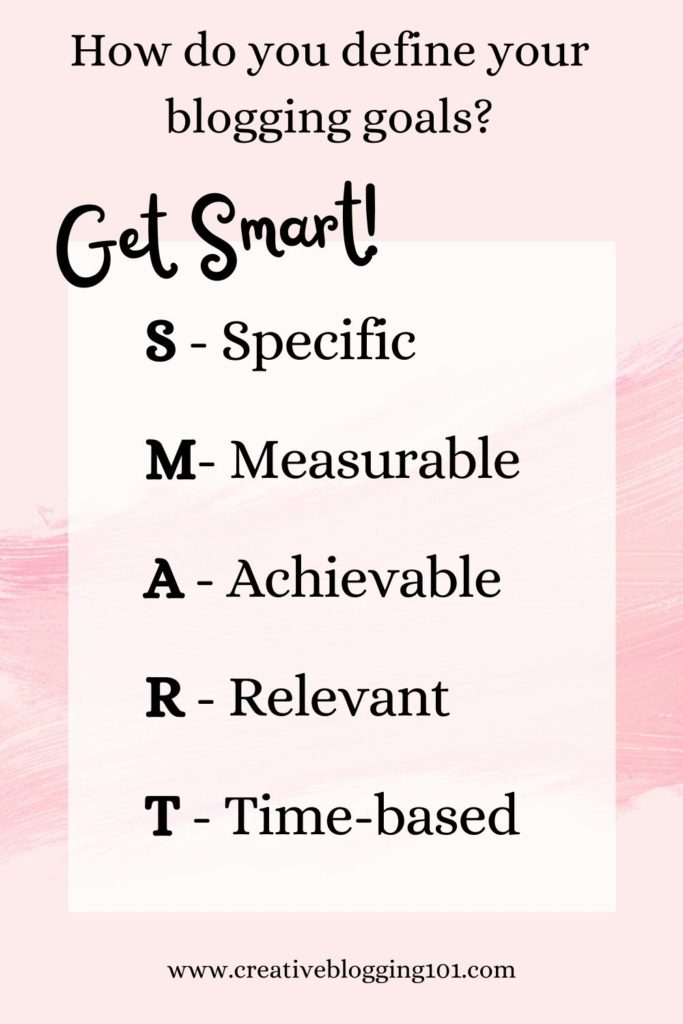
    How to define your blogging goals:

    1. Brain dump: Grab a notebook and write down all of your blogging thoughts, plans, goals, fears, and concerns. Get everything out. Trust me – it works and it makes you feel better! Keep in mind this is just a brain dump for overall blogging goals, not ideas for posts right now.
    2. Organize your thoughts: Draw a line down the center of a piece of paper. On the left side of the paper write “annual blogging goals” and on the right side write “ultimate blogging goals”. Go through your brain dump list and start sorting ideas into these two categories.
    3. Get S.M.A.R.T.: Now it’s time to set realistic and reachable goals, which you’ll find examples of all throughout this post. Examples of some goals are setting up an email address, getting 500 subscribers to your email list in the first 6 months, and so on.
      SMART stands for
    • Specific
    • Measurable
    • Achievable
    • Relevant
    • Time-based
    Define your blogging goals

    2. Set up your blog the right way.

    I know what you’re thinking, “What? I’ve already set up my blog!”

    There’s more to a blog than having a domain name and host and installing WordPress.

    Here are a few things you should focus on during your first year of blogging to get your blog set up correctly:

    1. Choose a theme: The theme is the template for the look and layout of your site. It’s where all of your brand colors and fonts come together in a user-friendly way.
      • Choosing a blog theme is important, but it’s not something you should spend a lot of time on in the beginning. You’ll always be improving the overall look of your site.
      • WordPress has free themes you can use or you can choose to go with a premium theme, which is not free. These are updated a little more frequently and have less of a chance of breaking down on you. But a free theme is the way to go when you’re first starting out with your blog.
      • Tips for choosing a theme:
        • It should be lightweight, not overloaded with plugins and data that is just going to slow it down.
        • It needs to be mobile-friendly.
        • It should be easy to customize.
    2. Set up categories: Categories are how you sort and group your blog posts into different sections.
      • To set up categories, go to your WordPress dashboard, then under “posts” click “categories” then “add new”. Name your category, set a slug, choose a parent category (only if this is a subcategory), set a basic description, then click “save”. (Learn the differences between categories and tags here.)
    3. Set up your main pages: Click here for information on all the pages you need to have on your blog and why they’re important. Setting up these pages is very important to focus on during your first year of blogging and I would recommend setting them up right away. These blog pages include:
    4. Create your menu: The menu sits at the top of your blog and is the best way to help readers navigate through your blog. You can add pages, posts, and outside links to your blog menu.
      • To create your menu, go to your WordPress dashboard and click on “appearance” then “menu”. Give your menu a new name (something like top menu or whatever), then save it.
      • Next, choose the pages your want to add from the left column and drag and drop them however you want them to show up on your blog.

    3. Set up Google Analytics.

    Google Analytics is a free tool provided by Google to help you track the traffic that comes to your blog.

    With Google Analytics, you can learn all about audience behavior on your site, such as their:

    • interests
    • demographics
    • the pages they visit the most
    • and more!

    Studying audience behavior through Google Analytics gives us bloggers the power to grow our blogs as well as serve our readers the best we can.

    You can learn everything you need to know about Google Analytics in this super helpful guide written Moz.

    what to focus on during your first year of blogging - create an email list

    4. Create an email list.

    Having an email list is the best way for your readers to get your posts. More than likely they are not going to remember to visit your blog every day to see if you’ve written a new post. To get them to see and read what you’ve written, you need to send them an email sharing that information. You should never depend solely on social media to share your blog.

    Creating an email list is one of the most important things to focus on during your first year of blogging. Aim to get at least 500 subscribers in your first blogging year.

    Why is having an email list so important for your blog?

    Email subscribers are more likely to share your content than they would if they saw your post on Instagram.

    Also, people signed up to get your emails for a reason – they’re interested in what you have to offer. Having an email list makes it easier to target the right people for offers and products.

    Best free email marketing tool:

    Most bloggers use ConvertKit for their email marketing. They are very user-friendly, their sign-up forms are customizable, and it’s FREE to sign up!

    How to build your email list in your first year of blogging:

    Step 1: Offer an incentive

    Incentives are often referred to as “lead magnets“. When visitors come to your site and see that they are going to get something free just for joining your email list, they are going to sign up. Everyone loves free stuff!

    They need to be useful, solution-focused, and goal-driven. If your incentive is not useful and doesn’t solve the reader’s problem, they are not going to bother signing up for it. Also, ask yourself where does the free incentive sit in your sales funnel? If you have a product to offer for sale, be sure the opt-in form leads subscribers to your product landing page after they sign up.

    Types of incentives to offer include:

    • checklists
    • eCourses
    • eBooks
    • video tutorials
    • workbooks
    • planners
    • calendars

    Step 2: Add opt-in forms to your blog

    Create eye-catching and conversion-focused opt-in forms with bold colors and fonts to attract attention. Be sure to place forms in strategic places throughout your blog, such as within every blog post and in the sidebar widget.

    Pop-up forms that catch people when they are about to leave your site are perfect attention-grabbers. Make sure they know what they are going to miss if they leave your site without signing up for your email list.

    5. Create valuable content.

    One of the main things to focus on during your first year of blogging is creating valuable content that attracts readers. Find topics that people are interested in and want to know more about. Search a topic on Google and look at the questions that pop up in the “People also ask…” box. Use those questions as questions you can answer in blog posts for readers.

    As a new blogger, you should get into the habit of writing every day. That doesn’t mean you should post a new blog post every day! But you should be focused on writing something, even if it’s just to rewrite and make an older post better. Aim for at least 2 blog posts a week and remember to remain consistent with your posts.

    Not every blog post needs to be SEO-focused and filled with a lot of keywords. During your first year of blogging, you should focus more on having content written and shared. Focusing on SEO and keywords will come later.

    Best types of content to write

    The best types of posts to write are called “pillar posts“. Pillar posts are meaty, useful, well-written posts that are engaging. They are usually filled with relevant images and helpful videos to help readers understand what’s going on. Topics in pillar posts are covered in-depth so much that people will link to them for years to come.

    Examples of pillar posts include:

    • “how-to” posts
    • lists
    • roundups
    • ultimate guides
    • definition articles (explain certain topics such as content marketing very in-depth)

    Comments count toward long-form content, too. Ask a question at the end of your post to get readers engaged.

    Related: 6 Steps to Take After Publishing a Blog Post

    6. Start monetizing your blog

    I would highly recommend that you start monetizing your blog during your first year of blogging. Don’t make the mistake of waiting until after you have published a ton of posts like I did. I spent months going back through posts and adding in affiliate links. This is so much easier if you start monetizing your blog from the beginning.

    What are the best ways to monetize your blog during your first year of blogging?

    1. Affiliate Marketing: Affiliate marketing is promoting someone else’s products. For example, sharing links to Amazon products within your blog posts. If someone clicks one of your links and makes a purchase you will receive a small commission.
      • Start off by promoting 1-2 affiliates directly related to your niche. To promote these affiliates you can write affiliate-related articles or place affiliate links within related blog posts. Also, you can place affiliate banners on sidebar widgets with eye-catching graphics. Be sure to promote affiliate links to your email list and on social media as well.
    2. Create a product to sell: Digital products are very popular right now. People are buying eBooks and printable planners now more than ever.
      • Types of products to create and sell include:
        • Digital products such as calendars, planners, eBooks, eCourses, copyright-free images
        • Services such as one-on-one consulting, coaching, photography, vacation planning
      • Before creating a product to sell to your audience, ask yourself these questions:
        • What does your target audience really need/want?
        • What questions do they have?
        • How can you solve the problems they are facing?
    3. Sponsored posts: Sponsored posts are articles that a company or brand pays you to write. You must include links to their products and services within your post. Reach out to brands and companies you love and trust. It’s best that you actually use their products so that you can share your honest review with your audience to build a trusting relationship with them.

    7. Drive traffic to your blog

    The main ingredient to a successful money-making blog is traffic. The more visitors you have, the more people you have to click on affiliate links and ads and buy your product(s). It can take up to 6 months for Google’s algorithms to fully index your site and for your blog to start ranking in top search results.

    During your first year of blogging, you should be focused on driving traffic to your blog through Pinterest and social media. Also, make sure to read and comment on other blogs. You may get lucky and gain new followers.

    Backlinks are another great way to drive traffic to your blog. Getting links to your blog from other sites with a higher domain authority will help you rank higher and quicker on Google. (Domain authority is a search engine ranking score developed by Moz that predicts how likely a site is going to rank in search engine results pages. The scores range from 1-100).

    Related: 20 Proven Strategies to Drive Traffic to Your Blog

    8. Start niching down.

    When you first start blogging, you might write about different topics to see what interests your audience the most. After writing several blog posts and studying Google Analytics, you start niching down and choosing your target audience.

    Niching down to a specific topic helps you rank in Google quicker and higher because Google can understand what your blog is about. Readers will also know exactly what your blog is about. And the ones who are most interested in the topic you’re writing about will sign up for your emails and keep coming back to read more.

    Also, when your blog is niched down, it tends to get more traffic from Pinterest.

    To niche down your blog, choose a topic that combines your passion and interests with your experience. Think about who can benefit from your skills. This will help you gain authority and build trust with your targeted audience.

    Related: Finding Your Blog Niche

    Having a successful blog shouldn’t be an overwhelming chore. There are a lot of sites out there jampacked with information on how to make money with your blog. If you try to do too much at once, you will get burnt out and overwhelmed and you will give up and quit. Therefore, your blog will fail and you will have lost valuable time and money.

    The above tasks are the most important tasks that you need to focus on during your first year of blogging if you are serious about having a successful money-making blog for years to come. In the following years you should be putting more focus on learning SEO, Google algorithms, long-tail keywords, and more to keep your blog going.

    If you’re a new blogger, what are your goals to focus on during your first year of blogging? If you’re an established blogger, what did you focus on most during your first year? Is there anything you wish you would’ve focused on sooner?

    pin me
    Most Important Things you need to focus on during your first year of blogging

  • 6 Steps to Take After Publishing a Blog Post

    You’ve written and published your amazing blog post. Now what? If you’re scratching your head trying to figure out what to do next, keep reading! I’m sharing 6 steps to take after publishing a blog post that will bring traffic to your blog and get you noticed!

    If you’re reading this, then you have more than likely already created your blog and you’ve written a few blog posts. 


    Congratulations!

    (However, if you are just curious and haven’t started a blog yet, click here for easy instructions on how to create your own money-making blog.) 

    But now what?  

    I’m sure you want others to read your posts and follow your blog. After all, you put a lot of hard work into it. But how do you get people to know that you’ve written a new blog post? 

    Keep reading for 6 steps to take after publishing a blog post.

    6 Steps to take after publishing a blog post
    steps to take after publishing a blog post

    6 Steps to Take After Publishing a Blog Post

    Following these steps after publishing your blog posts is very important, especially if your blog is a money-making blog. Even if your blog is just a hobby blog, you can still follow these steps to get a larger audience. 

    1. Promote

    Promoting your blog post is simply sharing it on your favorite social media site. Share every post to whichever social media you use the most. I would not recommend trying to use all of them. It just gets overwhelming and it will feel more like a chore that you hate. 

    Choose one social media site to start with, such as Instagram or Pinterest. (Pinterest is my favorite because it brings the most traffic to my site.)

    Also, it’s okay to share one post more than once. If you only write one post a week, break the post up into several sections to share on social media. 

    For example, let’s say you are publishing a blog post about organizing a kitchen pantry. 

    • Monday, share why keeping an organized pantry is so important on Instagram with photos of your messy pantry before and your organized pantry after. 
    • Wednesday, share the steps you took to get your pantry organized with photos. This is also a great opportunity to share the organizers and/or containers you used using affiliate links.
    • Friday, challenge your followers to get their pantry organized, too. 

    Promoting your posts is one of the easiest ways to get your posts noticed and bring in more traffic to your blog. After all, if you’re not sharing your posts with your social media followers, they’re not going to know you posted anything. Unless they’re on your email list, of course. (More on that later.)

    Click here for 14 sites you can promote your blog on for free.

    2. Track your stats

    Make sure you have Google Analytics installed and connected to your blog and that you’re taking advantage of it. It’s a free service that’s easy to use and it provides you with a ton of valuable information about your site. 

    With Google Analytics you can:

    • See how people find your site (organic search, social media, other sites, etc.)
    • Track what people do while they’re on your site (You can see how long they stay on your site, what pages they click through to next, etc.)
    • Gain data on visitors (You can learn their demographics, geography, and general interest – all of which help you learn your target audience.)
    • Figure out the most popular pages on your site (so you can write more of these types of posts)

    After publishing a blog post, you need to be checking your stats for all of this information. Checking your stats can help you learn how to improve your blog and your posts in the future. 

    3. Link to older posts

    Every time you publish a new blog post, you should include a link to that post in older posts that are similar. 

    For example, back to your pantry organizing post. Let’s say you have published a post in the past with a tutorial on how to organize your kitchen cabinets. After publishing a blog post on how to organize your pantry, go back to the kitchen cabinets post and add a link to the pantry post. 

    This is called “internal linking” and is great for SEO. It also decreases bounce rate, which refers to the percentage of visitors that leave your website after only viewing one page on your site. You want visitors to stay on your site for a while and visit other pages. Linking to other posts within posts will make it easier for visitors to find other relevant posts. Plus, it will keep them on your site longer.

    4. Create 3-5 pins for Pinterest

    Pinterest is the best way to get your blog posts seen by thousands of people. 

    I use Canva to create pins for my posts. It’s easy to do and I already have my pin templates set up for my brand. Canva is free to use and they also have a paid version that allows you to access all of their templates and photos. 

    Click here to get a free trial to Canva pro for 30 days. 

    After creating pins for Pinterest, you can schedule them to pin at certain times on the days you choose with Tailwind. This is so easy to do and saves you a lot of time. Tailwind isn’t free, but it is cheap and I would definitely recommend using them to schedule pins. 

    Click here to learn more about Tailwind and try it out for free to see if you like it.

    5. Send out an email

    Having an email list for your blog is a must. I know you’ve heard it all before, but trust me – it’s true. For my other blog, I send out a weekly email with a personal message and links to my latest blog posts. I make sure not to overwhelm my readers and fill up their inbox daily. 

    After publishing a blog post, make sure you’re sending it out to your email list so your readers will know about it. Your loyal followers will be excited to see what you’re up to and they’ll be eager to read what you’ve written. 

    If you haven’t already signed up for email, I would recommend ConvertKit. It’s easy to learn and they have the best customer service! If you ever need help, they respond quickly with answers. Plus, their opt-in forms are so pretty!

    To learn more about ConvertKit and to sign up, click here. They also have a free plan!

    6. Respond to comments

    Publishing a blog post that asks a question will more than likely get you a lot of comments. Make sure you are responding to all the comments as quickly as possible. This is great for SEO as well as for your readers. Nobody likes to be ignored. 

    Responding to comments is a great way to gain relationships with your readers. They’ll see you as a real person that they can relate to. And they’ll appreciate you taking the time out of your busy day to respond to them. 

    To recap:

    6 Steps to Take After Publishing a Blog Post

    1. Promote
    2. Track your stats with Google Analytics
    3. Add a link to the new post within relevant older posts
    4. Create 3-5 pins for Pinterest
    5. Email your list
    6. Respond to comments

    Canva

    canva

    Tailwind

    tailwind

    ConvertKit

    ConvertKit

    More blogging tips:
    20 Proven Strategies to Drive Traffic to Your Blog
    8 Steps You Need to Know to Writing Captivating Content
    Top 4 Ways to Make Money as a New Blogger

    pin me
    6 steps to take after publishing a blog post
  • Top 4 Ways to Make Money as a New Blogger

    Are you a new blogger hoping to make money from your blog?
    Have you heard others say it’s impossible to earn money blogging when you first start?
    Not true!
    Keep reading to learn about the top 4 ways to make money as a new blogger.

    Millions of new blogs pop up every week. But not all of them will make money.

    Starting a blog is easy and pretty cheap. (With Blue Host you only spend $3.95 a month!)

    Most blogs are hobby blogs, which are perfectly fine. Blogging is a great way to meet new people, learn about different cultures, and relieve some stress.

    However, most bloggers want to get paid for their hard work. And if you want to earn money blogging, then you have to go about it the right way.

    You have to put the required time and effort into your blog to build it into a profitable business.

    Blogging is a business and should be treated as such.

    make money as a new blogger

    *Post contains affiliate links. They are free for you to click on, however, I will be compensated if you make a purchase. This supports my family and I thank you for your support! To learn more, click here.

    But it takes time to grow, just like any other business.

    With some dedication and the right mindset, you will succeed in your blogging business.

    If you’ve already started your blog, then this guide is for you!

    If you haven’t started a blog yet, but want to, click here to learn how.

    How to Make Money As a New Blogger

    Believe it or not, it is possible to make money as a new blogger.

    I started blogging as a hobby and I loved it. I enjoyed sharing my crafts and DIYs with others.

    As I started to gain more traffic I decided I wanted to start earning money from all my hard work.

    So I started researching “how to make money blogging” and quickly became overwhelmed.

    There are millions of people out there writing about how to make money blogging!

    If you’ve been researching different ways to make money blogging and getting overwhelmed, don’t give up.

    I’m here to tell you that it is possible to make money blogging.

    And yes, you can make money as a new blogger, too.

    Top 4 ways to make money as a new blogger

    As an established blogger, there are many ways to monetize your blog. However, new bloggers are limited when it comes to making money.

    Here are the top 4 ways to make money as a new blogger:

    1. Ads
    2. Affiliate marketing
    3. Sponsored posts
    4. Products

    1. Monetize your blog with ads

    Almost every blog you visit has ads. (Sometimes too many!)

    Many bloggers allow ads on their site because they are easy ways to make money.

    However, top paying ad networks, such as Mediavine, require you to have a substantial amount of traffic.

    New blogs don’t start out with a lot of traffic. But that doesn’t mean you cannot have ads on your site.

    Google Adsense and Media.net both allow new bloggers to monetize their site with ads. Pay is decent with both companies.

    Media.net uses ads that are keyword links, which generally get more clicks. Most companies pay more for clicks than impressions.

    You can have both Google Adsense and Media.net on your site, however, you want to be careful not to have too many ads. This slows down your site and it’s highly annoying to visitors and readers. It will cause you to lose traffic.

    Media.net doesn’t overload your site with ads, but Google Adsense will.

    To learn more about Media.net and sign up for free, click here.

    2. Monetize your blog with affiliate marketing

    I’m sure you’ve visited a blog that has recommended some type of products. They include links to the products they are recommending.

    These links are called affiliate links.

    Every time someone clicks on the link and makes a purchase, the blogger will get paid for it.

    The top affiliate links I recommend to make money as a new blogger are:

    These affiliate links are all free to join and work best for every niche.

    If you choose to include affiliate links on your blog, you must include a disclosure statement somewhere on the post with the links. (I also include my disclosure on my privacy and disclosure page.)

    Click here to see how to set up a disclosure page.

    An example of a disclosure for sharing affiliate links is:

    • Disclosure: This post may contain affiliate links, meaning I earn a commission if you click through and decide to make a purchase.

    Amazon requires that you have a separate disclosure to share links recommending their products. An example would be:

    • As an Amazon Associate I earn from qualifying purchases.

    Honesty is the best policy when it comes to affiliate links. Only recommend products that you trust and love. This builds trust with your readers and they’ll be more inclined to make a purchase through your link.

    Your readers trust and value your opinion. Recommending products you actually use will have a higher chance of being purchased. And you’ll have a higher chance of readers purchasing more products through your links in the future.

    3. Monetize your blog with sponsored posts

    A sponsored post is a dedicated post that promotes a certain product or company. A company will pay you to present themselves or their product to your audience.

    Some examples of sponsored posts include:

    • product reviews
    • recommendations
    • articles about the company

    To get sponsored posts, reach out to a company and pitch your promotion to them. A lot of companies have links to be able to contact them on their website.

    Sponsored posts are an excellent way to make money as a new blogger. Some bloggers make all their money from sponsored posts alone.

    4. Monetize your blog with products

    Another great way to make money as a new blogger is to sell your own products.

    Right now, the top selling products for bloggers are digital products.

    With digital products, there is no inventory to keep up with and no shipping costs.

    The biggest digital product sellers are eBooks and eCourses.

    eBooks can be made by simply combining several blog posts together that you’ve already written.

    For example, on my other blog, I wrote a series of posts on how to save money at the grocery store. The series included 6 very detailed posts on different ways to save money on groceries.

    Now that the series is over, I’m working on turning it into an eBook that I hope to have finished in a few months.

    If you choose to write an eBook to sell to your audience, you can design the cover easily with Canva. I love using Canva because it’s so easy to use and they already have templates available for you. Plus it’s free!

    PicMonkey is another program to use to design your eBook cover. They’re also free and easy to use.

    eCourses allow you to teach others about a skill you’re very knowledgeable about. People love learning new things! And chances are you have something to teach them.

    Online learning is in high demand, which is great news for you if you have a skill to teach.

    Teachable offers a free plan that allows you to create and host your eCourse. They also offer great tutorials on how to get started and their site is user-friendly.

    Learn more about Teachable and sign up here.

    Printables are also great products for new bloggers to sell to make money. Printables can be easily created with Canva and PicMonkey.

    Top selling digital printables include:

    • checklists
    • planners and calendars
    • templates (cover letters, forms, resumes, etc.)
    • budget trackers
    • personalized invitations or announcements

    Many bloggers create printables as a free incentive to get visitors to sign up for their email list. But, you can also create them to sell on your own site or Etsy.

    By the way – having an email following is KEY to making money with your blog. If you haven’t set up your email yet, I recommend using CovertKit. It’s free to sign up, easy to manage, and they have the most user-friendly opt-ins.

    Sign up for free with ConvertKit here.

    How to gain traffic as a new blogger

    Now you have your blog and email opt-ins up and running, you need more traffic.

    You cannot make a lot of money as a new blogger without a lot of traffic.

    There are many different ways to drive traffic to your blog, but what you really want is for your blog to rank on Google. To do this, you need to learn and master SEO and keywords.

    Long Tail Pro is a great tool to use to search for keywords. It shows you exactly which keywords people are searching for.

    Conclusion

    Don’t let the negativity of others scare you away from blogging. Don’t let them tell you that there is no way to earn money with a blog.

    It’s just not true!

    There are many established bloggers out there who make a lot of money blogging and it’s their full-time income. They make a living from their blog and the products they create. And some make 7 figures!

    And it’s also possible to make money as a new blogger!

    Just don’t give up.

    Hold yourself accountable and put yourself out there.

    I know you can do it!

    pin me
    top 4 ways to make money as a new blogger

  • 20 Proven Strategies to Drive Traffic to Your Blog

    Are you struggling to drive traffic to your blog? You’re not alone. These strategies have been proven to help you gain more traffic to your blog.

    Have you ever looked at your blog’s analytics and just hear crickets?

    You’ve worked so hard and written a great post and now you’re wondering when all the people are going to start showing up.

    I get it! I’ve been there, too.

    When I started my first blog, I wrote a lot of posts before I finally had one reader. I was so excited! Slowly more people started following my blog, but most of them just wanted follow-backs. They never even read my posts.

    After a while, I started to figure out that I needed the “right audience” to gain the blog traffic that I needed.

    20 proven strategies to drive traffic to your blog

    *Disclosure: This post may contain affiliate links, meaning I earn a commission if you click through and decide to make a purchase. Thank you for supporting my blog!

    Why the “right audience” matters

    More traffic doesn’t always mean better.

    Your goal should be to bring in targeted traffic that is relevant to your blog. There needs to be a reason for people to come to your blog. These people have something specific they are looking for. If you are not providing them with the answers that they are looking for, then they’re not going to stick around.

    The “right audience” for your blog is the audience that becomes faithful readers. They sign up for your email list because they want to learn more from you. They quickly become your supporters. Learning the right people to target is the best way to drive traffic to your blog.

    Strategies to Drive Traffic to Your Blog

    1. Create audience profiles

    Before you start creating content, you need to figure out who your target audience is going to be. Your content needs to focus on your targeted audience in order to drive more traffic to your blog.

    Get a piece of paper and write down these questions:

    – How old are they?
    – What is their gender?
    – Are they married?
    – Where are they located?
    – What are their occupations?
    – What is their income level?
    – What nterests and hobbies do they have?
    – Do they use social media?
    – How much time do they spend online each day?

    The more details you know about your target audience, the more you will succeed within your niche. Your content will start bringing in the right audience and this will increase blog traffic.

    2. Find your blog niche

    Your blog niche is the topic all of your content will be focused on. It’s important to figure out your niche before you start your blog.

    Finding your blog niche can be done in 2 simple steps:

    1. First, make a list of everything you’re passionate about and want to share with others.
    2. Then, narrow down that list to pick one or more topics you want to write about.

    Be sure to read my post on how to find your blog niche to understand more about this topic.

    You can find a list of the top 10 money-making blog niches here.

    3. Research keywords

    Keywords are very important when it comes to SEO. Doing keyword research will help you discover what others are actually looking for. Also, you will be able to find unique content ideas and you can learn from your competitors.

    The best way to do keyword research is to use tools such as SEMRush. Once you get to the site, enter a keyword and your competitor’s blog URL (or your own) to find more keywords.

    Learning SEO and how to correctly research keywords are very important at getting you ranked on the top pages of Google. When someone is searching for a keyword you’ve used, your post will come up. Getting your site ranked within the first 3 pages of Google is the quickest way to increase blog traffic. Social media and Pinterest aren’t always as reliable at bringing more traffic to your blog.

    4. Plan traffic generating content

    – Select the right topic

    Before you sit down to write your first blog post, you need to think about the topic you’re going to write about. If you’re writing about a topic that nobody is interested in, then you’re not going to get any traffic at all.

    Here are some ways to figure out what other people are interested in:

    • Read lots of other blog posts
    • Visit forums
    • Visit Quora and see what questions are being asked the most
    • Use Google Trends to see what search terms are most popular
    • Use SEMRush to find out what keywords your competitors are ranking for in Google

    It’s important to remember that the topics you are writing about stay within your niche. Your goal for increasing blog traffic is to bring in the “right audience” and answer their questions.

    Recommended: 180 Blog Posts Ideas for Any Niche

    – Choose a content type

    • Certain types of content get more attention than others.
    • Content that includes lists and infographics tends to get more shares than other types of content.
    • For me personally, list posts seem to get shared more than any other post. They also generate the most traffic to my blog.

    – Add value to your post

    There are probably a lot of other articles out there that are very similar to what you’re writing about. The key is to stand out from those other writers. You need to figure out what makes your content different from all the rest.

    Maybe you go with a different angle or go into more detail. Or perhaps your posts are much easier to read or include more depth.

    The main idea of writing great content is to find the key that separates your content from all the others. If your content is the just the same thing someone has already read before, they’re not going to keep reading. Your posts need to be full of valuable content to bring in readers and drive traffic to your blog.

    Recommended: 8 Steps You Need to Know to Write Captivating Blog Posts

    5. Create attention-grabbing headlines

    Headlines matter. They’re like the first impression of our posts. The goal of an attention-grabbing headline is to convince people to read what you’ve written. And what better way to increase blog traffic than to lure them in with an attention-grabbing headline.

    Here are four tips to remember when writing your headline:

    1. It should be unique

    If your headline is just like everyone else’s, then you’re not going to stand out. Readers will think you’re just like all the rest and they won’t have any reason to keep reading.

    Your headline should have a personality. It shouldn’t be boring and robotic.

    2. Use numbers

    People love numbers. Since list posts are so popular using numbers in your headline will almost always guarantee your writing will be read.

    3. Be specific

    Try to summarize your content’s main point into one sentence. Just keep it simple and write exactly what your main point is. Then you can polish it up and create a specific and attention-grabbing headline.

    4. Use adjectives

    Use adjectives in your headline that trigger emotions, such as:

    • Excellent
    • Simple
    • Valuable
    • Mind blowing
    • Proven

    Using emotion-evoking adjectives in your headline will grab readers’ attention and make them want to read more.

    6. Update old content

    You should always update old content if you want to drive traffic to your blog. When your content becomes outdated, it’s not as helpful to readers. Plus, outdated content will not rank as high in search engines. They like fresh content.

    To see which blog posts you should update first, check your analytics. Find the posts that don’t get as much search traffic anymore. Update those posts first. Fill them with keywords and add or update images and graphics that help the reader understand your content better.

    One rule of blogging is that you should always be writing. Either writing new content or updating existing content. Writing daily will improve your writing overall. Practice makes perfect! Once your writing improves and your content gets better, your blog traffic will increase because you’ll be ranking higher on Google.

    7. Make your content visual

    Visual content will almost always get shared more than text, therefore driving more traffic to your blog. People love seeing images and graphics and nowadays videos are more popular than reading.

    Here are some ways to make your content more visual:

    • Create a unique featured image
    • Use graphs and charts to help readers visualize data
    • Embed a video
    • Include a shareable infographic
    • Add screenshots
    • Include a unique graphic
    • Include a meme or cartoon

    8. Make your content readable

    Humans have a short attention span. We need to be able to glance at a site and easily scan the contents. If all the words are jammed together in one long paragraph, readers are not going to stick around.

    To solve this problem, our content should be easy to read. Use smaller sentences and paragraphs to break up the content.

    Also, consider using bullet points and lists in your posts. Use bold print to highlight your most important points. And don’t forget to include the visual aspects.

    9. Mention influencers

    In your next blog post, link to other posts written by influencers specific to your niche. However, you should only mention them if it adds value and helps your readers. Don’t just mention them because you want to increase blog traffic. That’s not going to work.

    After you’ve mentioned them in your post, reach out to them and let them know that you did so. People love to share stuff about themselves so more than likely they’ll share your post with their audience.

    A great way to mention an influential blogger on your blog is to interview them. Readers like to get another person’s perspective on certain topics.

    Also, you can invite influential bloggers to contribute to your blog. This can be a great way to get more content and drive traffic to your blog.

    10. Improve your site

    • Redesign your site

    Your site’s design really does matter. Having a clear site that readers can enjoy will keep them coming back.

    You don’t even have to be a developer or designer to have an impressive site design. WordPress offers many free themes or you can choose a paid theme. Paid themes do get updated more often and tend to work longer than free themes.

    • Remove distractions

    Everything on your blog should have a purpose. If you have distracting ads or pop-up videos that can’t be closed, readers are not going to stick around. You want readers to stay on your site and browse around. Nothing makes me leave a site faster than videos popping up and ads slowing the site down. I’m there for one reason – to read their content and find out more. Not to wait 3 minutes to close an ad before I can read anything.

    • Improve site speed

    Page loading times are super important when it comes to your blog. If people come to your site and your page takes too long to load, they are going to leave.

    Check your site’s speed with tools such as Google’s PageSpeed Insights. It will give you an idea of how to improve your pages’ load times.

    – Add internal links

    When you write a blog post, always include links to other relevant posts that you’ve written. This makes it easier for readers to find your best content and also keeps them on your site longer. It also makes it easier for search engines to index your content. Your number one goal is to drive traffic to your blog and your second goal is to keep them on your site longer.

    – Add social sharing buttons

    You want to make it easier for readers to share your content with their audience. They might want to email your post to their family and friends or pin it to Pinterest for later reference. Pinterest is a great way to bring in traffic to your blog, too.

    11. Build an email list

    Having an email list is one of the most important things you can have for your blog. You can send a weekly email to your readers sharing the content you posted for the week. They’ll be able to easily access the links in your email, bringing them to your blog week after week.

    Offer readers a reason to sign up for your emails. For example, offer a free printable checklist or worksheet relevant to your niche. If you write about blogging, offer a free blogging content calendar or a list of 100 blog post ideas. People need a reason to sign up for your email. If they feel it’s not worth it then they’ll never sign up. Drive traffic to your blog with free incentives for signing up for your email list.

    A lot of bloggers use Convert Kit to build their email lists. You can sign up for a free account here.

    12. Write a guest post on another blog

    One of the easiest ways to increase blog traffic is to guest post for another blogger. By guest posting, you are getting yourself out there and making yourself known.

    Ask a fellow blogger in your niche if you can write a guest post for their blog. If they say yes, return the favor and let them guest post for yours.

    You can also add a “work with me” page on your blog letting others know you are willing to guest post for them.

    13. Comment on other blog posts

    Leaving helpful comments on other blogs is not only a nice way to meet other bloggers. It’s also a great way to get noticed. More than likely the blogger will visit your blog and return the favor.

    However, don’t leave comments with your blog link requesting they read your blog. This is a turnoff and the comment will probably just get deleted or put in spam.

    Focus your comments on being helpful and building relationships. These relationships will eventually open doors for you.

    14. Pin your content daily

    The majority of my blog’s traffic comes from Pinterest. I create and schedule 8-10 new pins every day. My pinning schedule runs from 8am to 10 pm with fresh pins being shared every 2 hours.

    Some bloggers will tell you to pin way more, but I personally don’t feel like you need to do more than that. At least 5 pins a day is fine. It does take a little while for pins to get noticed and be shared, but it does happen.

    Tailwind is a great scheduling tool to make Pin sharing so much easier. It can get rather overwhelming trying to manually pin those pins every day. Try Tailwind free here.

    15. Learn SEO

    Perfecting SEO is one of the best things you can do for your blog content. Good SEO makes your site more search engine friendly. I’m not going to get into SEO here, but there are tons of free advice step-by-step tutorials online.

    Good SEO also gets you ranked higher in Google, which increases blog traffic.

    A great site to learn more about SEO is wpbeginner.com. They have an excellent step-by-step SEO guide for beginners.

    16. Watch social media

    There are always questions being asked on social media sites such as Twitter and Facebook. Use these questions to drive traffic to your blog. Jump right into these conversations by adding a link to your relevant content.

    17. Track your keyword rankings

    After you’ve created and promoted your content, you need to start tracking its performance. You can do this with Google’s free tool: Google Search Console.

    This tool will give you a full view of all the keywords your website is ranking for. You can also view your top-performing keywords and see a list of potential keywords that will help you drive traffic to your blog.

    You should seriously be using Google Search Console from the very beginning.

    18. Track site traffic and user engagement

    Google Analytics is another important tool you should be using for your blog. This tool tracks visitors to your site and lets you know where they are coming from. You can also see what they’re doing while on your site. This can be very helpful in knowing what’s working for your site and what’s not. Once you find out what people visiting your site are most interested in, you can start increasing traffic to your blog by writing more posts on that topic.

    19. Be a podcast guest

    Podcasts have become extremely popular over the years. There are tons of people that create podcasts on topics you write about. Seek them out and pitch to be a guest on one of their podcasts. Do a Google search for top podcasts in your niche and pick a few to pitch to.

    20. Offer free stuff

    Everyone loves getting something free. The right template given out for free can really drive traffic to your blog. Offer something related to your blog’s niche such as a checklist, a worksheet, an eBook, or even a free mini-course.

    If your audience knows that you are offering free templates, they’ll stick around for more. And more than likely they’ll share that info with others, bringing them to your blog, too.

    Do you have any proven tips to drive traffic to your blog? I’d love to know what works best for you!

    pin me
    20 Proven Strategies to Drive Traffic to Your Blog
  • 14 Sites You Can Promote Your Blog for Free

    Promoting and driving traffic to your blog isn’t exactly the easiest thing to do. Keep reading to learn about sites you can use to promote your blog for free.

    Driving traffic to your blog can be such a struggle. I know! I get it!

    You write an amazing article (link), hit publish, and assume millions of people are going to read it immediately. Only there’s just the sound of crickets as you check your site analytics.

    The truth is, nobody knows you’ve written anything.

    So how do you get yourself and all of your must-read content out there? You have to promote your blog and your brand.

    promote your blog for free

    Why should I promote my blog?

    Promoting your blog posts is probably the most rigorous side of blogging. Twenty percent of your work will go to writing, while the other 80% will be all about marketing, promoting, emailing, networking, etc.

    If you do not promote your blog – no one will know it’s there.

    You may have the best content there is, but there will be no one to read it.

    Writing great content isn’t always enough to get readers to your blog. You have to know how to promote it, too. Otherwise, all that hard work will be wasted.

    Where to promote your blog for free

    *Disclosure: This post may contain affiliate links, meaning I earn a commission if you click through and decide to make a purchase. Thank you for supporting my blog!

    1. Medium

    Medium is an online publishing platform with nearly 100 million visitors per month. A lot of freelance writers post their blogs on Medium so it’s a great place to promote your blog. Both writers and bloggers can share their content and also get paid.

    You can think of Medium as sort of the YouTube of writing. It’s free to write on, but if you’re just there for the articles, you’re only allowed to read 3 per month for free.

    2. Pinterest

    Pinterest is a great place to bring in traffic for your blog. There are over 250 million people using Pinterest and 90% of them use it to make purchase decisions.

    You can promote your blog to Pinterest for free while also building a community and driving traffic to your site. If you’re looking to make your Pinterest bio and boards more SEO friendly, I’d recommend having an expert help you. Christina Faye Creative did an excellent job fixing my Pinterest which helped bring a lot of traffic to my site.

    Pinterest has group boards you can join as well. This site has a list of boards you can join by niche.

    3. Instagram

    Instagram is a great social media site to use for blog promotion. Especially since there are over one billion monthly users on the platform. You can share photos and put your blog link right in the bio section. Also, you can use tags so others can easily find your content.

    Once you have 10,000 followers on Instagram, you’re allowed to place links in your stories.

    4. Flipboard

    Flipboard started out as a magazine-style feed reader. It is now one of the main choices for feed reading.

    Basically, you’re flipping your content into a magazine, which you can also promote on social media sites. It takes a little while to get used to using Flipboard, so you may want to take some time to learn how to use it first.

    5. Facebook Groups

    Facebook groups are one of the top ways to reach users, especially since over a million people use them. You can create your own group, which works really well for craft and food bloggers. Creating your own group allows you to share content from others as well as promote your own blog content.

    Or you can join other Facebook Groups in your niche that allows you to share your content.

    6. YouTube

    When you post an article to your blog, consider turning it into a video and sharing it on YouTube. It seems that nowadays people are turning more to video than reading. Get this – at least 5 billion videos are being watched on YouTube every single day! I’d say YouTube is a great way to promote your blog posts and get noticed.

    7. LinkedIn

    Another great place to promote your blog posts for free is LinkedIn as a link in a share. Or, you can create an article right on LinkedIn.

    One of the best things about this site is that most of the users are professionals. Therefore, your content can be seen by hundreds of influential professionals within your niche. What a great way to get freelance work!

    8. Twitter

    I know Twitter has gone a little crazy lately, however, it’s still a great place to share your blog content. You can add photos and links right to your posts. Also, you can join in with other bloggers and create a community. Sharing each other’s content is really helpful in bringing traffic to your site.

    9. Email List

    I know you probably hear this a lot, but having an email list is extremely important for your business. Your email list is your blog’s most valuable asset.

    People who sign up for your email list are your most avid readers. They know you and trust you and support you.

    Convert Kit has simple features to make growing your email list easy. And it’s used by a ton of bloggers! It was created for bloggers by bloggers, so they understand exactly what you’re looking for.

    You can sign up for a free Convert Kit account here.

    10. Quora

    Quora is a question-and-answer site. When someone asks a question on the site, you can link your content to it as a relevant answer. Not only does this answer their question, but other readers will click on your link to read your content as well.

    The aim here is to get a lot of upvotes. When you get the most upvotes from the community, your answer will show up first.

    Tip: Be sure to focus on questions within your niche.

    11. Reddit

    Reddit is a large online community sharing almost every topic you can imagine.

    You must be an active member and provide value first. Remember to search for subreddits in your niche to contribute to. That way you’ll be able to add links where applicable, driving traffic to your site while promoting your blog for free.

    12. Bloglovin’

    Bloglovin’ automatically pulls your latest blog content and shares them to their site in various categories. This way the Bloglovin’ community gets to see your newest articles and they’ll visit your blog for more information.

    Also, you can follow your favorite bloggers for their latest content. And hopefully they will follow you back.

    13. Mix

    Mix is somewhat similar to Flipboard with its magazine-like features. However, if one of your articles starts to trend on Mix, then you have the opportunity to bring in thousands of new readers. I’ve used Mix for a while, but I honestly have to say that I have no idea how it really works. I share (or “mix”) other bloggers’ content as well as promote my blog on there.

    14. List.ly

    List.ly is all about creating lists. You can create tips lists or lists of anything you can think of! List.ly lets you create a list on their site, embed it to your blog, and then lets others add to your list. This keeps your blog posts current and updated for you.

    List.ly allows you to add external links with your listed items so you are building backlinks to your blog. And you might get lucky and have List.ly feature your list on their homepage, which means a lot more traffic to your blog.

    There are many different options for getting yourself and your articles out there. I would recommend trying different sites to promote your blog and seeing what works best for you. When you find the best option, learn it and stick with it.

    However, I would not recommend promoting your blog on more than 2 or 3 sites, to begin with. You will get overwhelmed and that may decrease your motivation to keep going.

    The most important tip I can give you for driving traffic to your site is to be patient. Increasing blog traffic isn’t something that just happens overnight. But, no matter how long it takes, don’t give up. You will get there!

    pin me
    promote you blog for free
  • The Difference Between Categories and Tags in WordPress

    Learn the difference between categories and tags in WordPress with these definitions and examples.

    Whether you are starting a WordPress blog or have been blogging for a while, categories and tags can be confusing.

    While both can be used to organize your site’s content by topic, there are some major differences between categories and tags.

    In this article, I’ll cover the difference between categories and tags, an explanation of each, and how to create them.

    difference between categories and tags

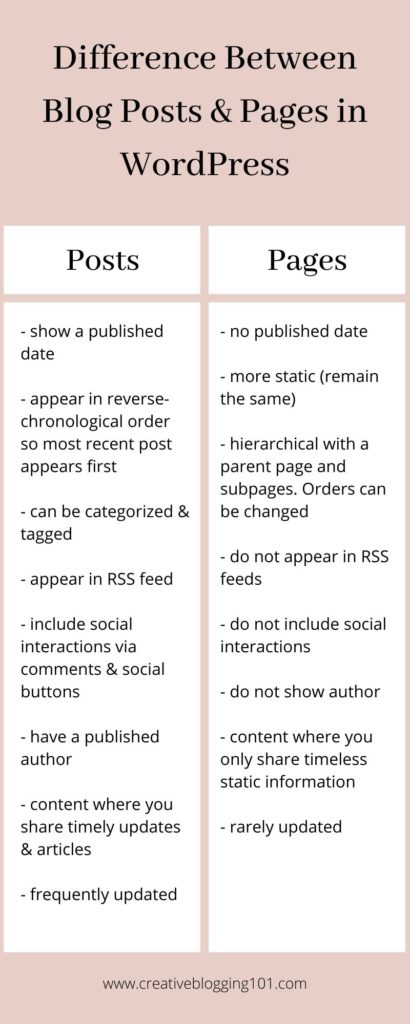
    Related: Blog Posts and Pages: What’s the Difference?

    The Difference Between Categories and Tags in WordPress

    What are categories?

    Categories are used to group the primary topics together & help your readers understand what your site is really about. They are meant to group your blog posts by general topics. They are kind of like the table of contents of your site.

    WordPress posts are required to have one category. If a category is not assigned to a post, it will go under “uncategorized”.

    Categories are hierarchical, meaning you can have subcategories under each parent category. For example, let’s say your blog’s main topic is Household Tips and Hacks. The main category could be “House and Home” with subcategories such as “cleaning tips”, “organizing tips”, and “home hacks”. This helps organize your site so readers can find what they’re looking for easily.

    How to create categories

    1. In the WordPress dashboard, under Posts, click on Categories.
    2. Fill in all the information for the new category – name, slug, and a description of the category. Then click “add new category“. This is called a “parent category.”

    Let’s use the Household Tips blog as an example.

    • Category name: House and Home
    • Slug: house-and-home
    • Description: Tips and hacks to keep your home clean and organized.

    How to create subcategories

    To create a subcategory, you are going to do the same thing you did to create a category. Only this time you’re going to choose a “parent category“. (For example, “House and Home”.) Then click “add new category“.

    If you have already written a post and want to change the category, simply go to Posts > All Posts and select the post want to change. Choose the correct category and click Save.

    Tips on using categories

    • Start with a few general categories and create more as your blog grows.
    • Be consistent: categories are meant to organize your posts so you don’t want a ton of categories.
    • If you are a new blogger, write down the topics you want to cover on your blog, then group like ones together with categories.
    • Include a description of the category. While not necessary, they are helpful for your readers to understand what the category is about.
    • Capitalize categories names.

    What are tags?

    Tags are more for describing specific details of your posts. These are more like your site’s index words. They lead readers to similar posts and help visitors find related content easily.

    Unlike categories, tags are not automatically assigned nor are they hierarchical. Tags are optional, but they are recommended to help readers find similar content on your blog. When a reader clicks on a tag, the will be taken to the archive page where all the posts with that tag are stored.

    How to create tags

    1. To add tags before writing posts, go to Dashboard > Posts > Tags. Add a new tag name, the slug, and a short description.
    2. To add new tags while writing new posts, add the tags to the tag section on the right side of your screen. All you have to do here is right in the tags you want to use. Keep in mind you want similar posts to have the same tags.

    For example, if you are writing a post for a book review, tags could be something like “fiction”, “mystery”, or whatever fits the post.

    Tips on using tags

    • Use tags liberally – a tag can just describe one section of the post, not a summary of the entire thing.
    • Use the same tags for multiple posts.
    • Have fun with them – you can use longer phrases for tags just as long as they link similar posts together.
    • Use descriptive tags – Use clear tags that are easy to understand. Think about how search engines will understand them.
    • Use lower case letters – not required, but common practice and helps readers determine the difference between categories and tags.

    To recap:

    The differences between categories and tags are:

    • Categories are required, tags are not
    • Categories are hierarchical, tags are not
    • Categories are used to link main topics together while tags are used to link similar posts together
    • Category names should be capitalized, tag names should be lower case
    information on categories and tags

    You might like to read these next:
    180 Bog Post Ideas for Any Niche
    Branding Your Blog: A Step-by-Step Guide
    Important Pages Every Blog Should Have


    pin me
    Difference Between Categories and Tags in WordPress

  • Blog Posts and Pages: What’s the Difference?

    When you are starting a blog in WordPress, the difference between posts and pages can be confusing. In today’s post, I’m going to explain exactly what posts and pages are and when and how you should use them.

    When you start a blog with WordPress, you will see two ways to create content – posts and pages.

    At first, it can be a bit confusing to know when and how you should use each one. When I first started blogging, I had the hardest time keeping these two separated and knowing which one did what.

    It’s important to understand the difference between blog posts and pages in order to make your site more user-friendly.

    Keep reading to learn exactly what blog posts and pages are, when you should use them, and exactly how to use them.

    blog posts and pages

    Related: The Difference Between Categories and Tags in WordPress

    What are blog posts and pages?

    What is a blog post?

    Blog posts are where you share your articles for your readers or your latest updates. They are shown in reverse-chronological order, meaning the most recent post will be shown at the top of the page.

    What is a blog post made up of?

    Blog posts are made up of several different things:

    • Post title: A great title catches the reader’s attention so they’ll want to read your content.
    • Date published: All blog posts show the date the content was published, usually appearing at the top of the post.
    • Written by: This is the author who wrote the blog post.
    • Content: Content is where you write the article you want to share with your readers.
    • Comments: The comments section allows your readers to respond to your content. This is a great way to interact with your readers and get to know them better.
    • Categories: Categories are how you organize your blog posts so readers can find what they’re looking for easily.
    • Tags: Tags help readers locate similar content on your blog.

    What is a blog page?

    Blog pages are used to share important information, such as legal information. Pages are more permanent and do not require frequent updating.

    What is a blog page made up of?

    Blog pages are only made up of two things:

    • Page title: The page title lets your readers know what your page is about.
    • Content: This is where you write the important information you want to share on your page.

    The Main Difference Between Blog Posts and Pages

    Blog posts in WordPress are shown by date on your blog site. They have an official publish date attached to them.

    Posts are listed in reverse-chronological order, meaning the most recent post is shown first to readers visiting your site.

    Blog pages in WordPress are meant to be timeless and have no publish date. They are more permanent and do not require updates often. Some examples of blog pages are an “about” page and a “privacy” page.

    Pages are content that visitors to your blog should always see no matter when they visit. They should be placed somewhere on your site where they can be seen, such as your menu, sidebar, or footer.

    Related: Important Pages Every Blog Should Have

    To recap:

    • Blog posts have a publish date and are for normal blog posts and updates.
    • Blog pages do not have a publish date and are for timeless static content.

    Other Differences Between Blog Posts and Pages

    1. Posts can be categorized, pages are hierarchical

    Blog posts have the option to be put in a category and have tags assigned to them. You can find these options on the right side of the screen beside where you write your blog posts.

    Blog pages do not have categories or tag options. Pages are organized hierarchically, meaning you can have subpages, or “child pages” within a page. This is to help you organize your pages together.

    2. Posts are social, pages are not

    Posts include social sharing buttons and a comments section. They are meant for your audience to interact with you and share your content.

    Pages do not include social sharing buttons or a comment section. You probably don’t want visitors to share your privacy page or comment on your contact page.

    3. Posts have a published author, pages do not

    Blog posts in WordPress usually have the author who wrote the content shown at the top of the post. This is usually found next to the published date, depending on your theme.

    Blog pages do not list an author.

    4. Posts are included in RSS feed, pages are not

    Posts will show up in your RSS feed, which allows your audience to subscribe to your content using an RSS reader.

    Pages do not show up in RSS feed. Only your blog’s latest posts will be seen in an RSS reader.

    I hope you now have a better understanding of the differences between blog posts and pages. It’s really important to know the differences so your site will be easy to read and readers can find what they are looking for. You want your site to be user-friendly because if it’s too hard to navigate, visitors will only visit once.

    infographic
    pin me
    blog posts and pages
  • 180 Blog Post Ideas for Any Niche

    Do you have writer’s block? Are you having trouble figuring out what to write about in your nice? In this post I’m sharing some great blog post ideas to help you overcome writer’s block.

    Let’s face it – we all get writer’s block at some point. We open our notebooks and stare at the blank page for hours before shutting it, frustrated.

    Maybe you have writer’s block right now and have no idea what to write for your next blog post.

    Well, you’ve come to the right place because listed below are 180 blog post ideas to help you overcome writer’s block.

    I’ve broken the blog post ideas down under specific niches, but you can use these ideas for any niche! Make them your own and get that blog post written today.

    blog post ideas

    Do you need help finding your blog niche? Click here to read all about blog niches.

    Blog Post Ideas for Any Niche

    Food blog

    1. Quick dinner ideas for busy families
    2. Easy after-school snacks
    3. Diet specific recipes (keto, low carb, low sodium, etc.)
    4. Best Instant Pot dinners
    5. No-bake dessert recipes
    6. Dinner ideas for date night
    7. Recipes with 5 ingredients or less
    8. Meatless Monday recipes
    9. Cookbook reviews
    10. Pinterest recipe fails
    11. Must-have kitchen gadgets
    12. Gift basket ideas for new bakers
    13. Growing your own herbs
    14. The best herbs you need for cooking
    15. How to organize your kitchen
    16. Restaurant reviews in your town, city, state, etc.
    17. Tips for food blog photography
    18. Getting your kids involved in the kitchen
    19. Holiday meals roundups (Christmas, Thanksgiving, Easter, etc.)
    20. Best holiday desserts (Christmas, Thanksgiving, Easter, etc.)

    Beauty blog

    21. Skincare for each season (Fall/Winter/Spring/Summer)
    22. Latest beauty trends
    23. Newest beauty products
    24. Best drugstore products
    25. How to choose colors for your skin tone
    26. Hairstyles that compliment your face shape
    27. How to organize your makeup drawer
    28. Best storage containers for makeup
    29. Easy updos for prom
    30. Best hair masks for dry, damaged hair
    31. Makeup product reviews
    32. Hair product reviews
    33. Skin product reviews
    34. Expensive makeup dupes
    35. Top beauty hacks
    36. Skincare routine
    37. Self-care routines
    38. Beauty stocking stuffers
    39. Top 10 drugstore beauty products
    40. Beauty trends to avoid

    Health/Fitness blog

    41. Top foods for reducing inflammation
    42. How to overcome the fear of judgment at the gym
    43. Walking plan to lose weight
    44. Best free fitness apps
    45. Yoga for beginners
    46. Meal tips for weight loss
    47. Habits to overcome when you’re trying to lose weight
    48. How to get motivated for exercise
    49. Best workout gear on Amazon
    50. The most comfortable leggings for working out
    51. Best stretches for runners
    52. Free YouTube workout videos
    53. Training together as a couple
    54. How to create a fitness plan
    55. How to fit in a workout on your lunch break
    56. Quick workouts for stay at home moms
    57. Creating a healthy meal plan
    58. Best playlists for working out
    59. What should you put in your gym bag
    60. Daily heart-healthy activities

    Parenting/Mom blog

    61. What to pack in your hospital bag
    62. Staying healthy during pregnancy
    63. Trendy maternity clothes
    64. How to care for a baby on a budget
    65. Best books for children
    66. Potty training do’s and don’t’s
    67. Family game night ideas
    68. Date night ideas for new parents
    69. Homeschool curriculum for all ages
    70. How to organize the playroom
    71. How to keep everyone sane on road trips with kids
    72. Summer activities with kids
    73. Fun craft ideas for kids
    74. How to bond with your baby
    75. How to bond with your teen
    76. Playdate ideas
    77. Setting boundaries for screen time
    78. Supporting your kids through grief
    79. Best books for preteens going through puberty
    80. How to cope with empty nest syndrome

    Lifestyle/Personal Development blog

    81.. Creating healthy habits at the beginning of the year
    82. Embracing mental health
    83. Creating morning habits for a successful day
    84. How to create a budget and stick to it
    85. How to overcome rejection
    86. 5 ways to be happier during winter
    87. Reduce anxiety and stress naturally
    88. Motivational/Inspirational quotes
    89. 50 date night ideas on a budget
    90. Bullet journal ideas you need to know about
    91. Simplify your life with these 7 productivity hacks
    92. Money-saving tips and tricks
    93. How you paid off your debt
    94. Movie night ideas
    95. Movie reviews
    96. Book reviews
    97. Holiday gift guides
    98. How to say “no” without feeling guilty
    99. How to be a happier person
    100. 10 ways to stick to your to-do lists

    Cleaning/Organizing blog

    101. 10 ways to organize your home quickly
    102. Organizing tips for the bedroom/bathroom/kitchen/living room
    103. How to clean up fast before company
    104. How to make your own natural cleaning supplies
    105. Fragrance hacks you need to try
    106. Top 10 cleaning hacks for the kitchen
    107. How to deep clean the bathroom
    108. Getting rid of that urine smell in the bathroom
    109. Best organizers for your bedroom/bathroom/kitchen/living room
    110. Tips for cleaning and organizing the garage
    111. How to clean and organize your basement
    112. Quick organizing tips for busy moms
    113. Quick cleaning tips for busy moms
    114. How to keep the house clutter-free when you have kids
    115. How to organize just about anything
    116. How to organize a bathroom so you can get ready quickly
    117. Things you shouldn’t keep in your refrigerator
    118. How to organize a pantry on a budget
    119. 10 things in your home that’s making you sick
    120. 5 motivational ways to clean when you just don’t feel like it

    Home Decor blog

    121. Dollar store hacks for small spaces
    122. How to make a small room look bigger
    123. 7 DIY decor ideas you can make on a budget
    124. Frugal home décor hacks
    125. Best color trends of the year
    126. How to add pops of color to your home
    127. 5 indoor plants that look amazing in your home
    128. Holiday decorating ideas
    129. Holiday home decor DIY’s
    130. How to style your living room
    131. 15 home décor ideas for your living room
    132. Home tour
    133. How to live through a home renovation
    134. How to style a shelf or tv stand
    135. Best patio décor ideas
    136. How to create a gallery wall
    137. How to use keepsakes in your modern décor
    138. Latest furniture trends
    139. How to paint furniture
    140. Top trending light fixtures for any home

    Travel blog

    140. Best ways to travel with kids
    141. What to take on vacation
    142. Hotel reviews
    143. Airline reviews
    144. Beginner traveling hacks
    145. Best destinations for couples
    146. Family-friendly destinations
    147. Cruise review
    148. How to plan a family vacation on a budget
    149. How to pack to save space
    150. How to save money while on vacation
    151. Carry-on bag checklist
    152. Best suitcases roundup
    153. Tips for traveling with a baby
    154. Must do road trip ideas
    155. Travel guide for your state
    156. 7 best places to travel this year
    157. Places to avoid while traveling
    158. Top 15 books for travelers to read
    159. What to pack for traveling overseas
    160. How to travel to a foreign country

    Personal Finance blog

    161. Understanding your electric bill
    162. How to conserve heat in the winter
    163. Best energy-saving lightbulbs
    164. Grocery shopping on a budget
    165. How to reduce food waste
    166. 55 ways to save money at home
    167. How to use coupons at any store
    166. Alternatives to eating out
    167. How to get by without using credit cards
    168. 25 ways to make money with side jobs
    169. How to make your own cleaning supplies to save money
    170. Gift ideas to make on a budget
    171. Tips for selling online
    172. How to watch your favorite tv shows without cable tv
    173. 20 ways to entertain for free
    174. Financial books you need to read today
    175. Top money mistakes young people make
    176. Creating a budget and sticking to it
    177. Budget tips for beginners
    178. Personal financial goals for the year/month
    179. Teaching personal finance to teens
    180. Teaching your kids how to save money

    Pro tips for overcoming writer’s block

    *Disclaimer: Affiliate links included. Click here to read more about what that means for you.

    • Keep a running list of ideas
      • Have a notes app on your phone and jot down blog post ideas as you think of them
      • Keep a notebook and pen close by so whenever you think of an idea you can write it down
      • Keep a blog post idea worksheet in your blog binder to write a running list on (You can get a free printable blog post idea worksheet in my free resources page!)
    • Write ideas on Post-It Notes
      • I stock up on Post-It Notes and stick them everywhere! I have them on my blog binder, in my notebook, and sometimes stuck to my computer.
    • Use your ideas as email topics, too
      • For example, if you write a bunch of posts about how to organize different rooms in your home, then send an email to your list titled “How to organize every room in your home”. Include your list of posts to get your readers involved.
    • Just start writing
      • Start writing a post and if it just sucks, then stop. Save it and come back to it later. Sometimes all it takes is a little time and a mood shift to come up with better content.
    • Keep writing
      • The more you write the more the blog post ideas will start flowing into your mind. Give it time and never give up!
    pin me
    blog post ideas
  • Branding Your Blog: A Step-by-Step Guide

    Do you want your blog to stand uniquely stand out from others? Are you ready to bring in lots of traffic to your blog? You need to put some time into branding your blog to make that happen!

    When I first started blogging way back when, I had no idea what branding your blog even meant! I was all over the place with my colors because I just wanted it to be “pretty.” It wasn’t until I realized I wanted to take my blog further that I started researching blog branding.

    After a total blog rebrand I started gaining more traffic to my site. I changed my theme, organized my menu, and stuck with just a few colors. Now I stay consistent with everything so my readers know exactly how to find me easily.

    Overall, I think my readers feel more comfortable coming to my blog and that has helped them gain a trusting relationship with me.

    branding your blog

    What is Blog Branding?

    Blog branding is not just your logo. It’s how people recognize you and your blog and/or business. You want to stand out from others and you need to be remembered. This is why it’s so important to put time into branding your blog.

    For example, say you are scrolling through Pinterest and you see a lot of similar pins from a certain blogger, or business. Their pin colors, styles, and fonts are always similar. After a while when you see that pin style you immediately know who created it. That’s their brand.

    Blog branding is all about your color scheme, the fonts you use, your overall theme, your logo design, and your graphics. And I’m going to show you how to put all of those together so you can start branding your blog today.

    Steps to Branding Your Blog

    *Post contains affiliate links which means I’ll be compensated if you make a purchase. Click here to read more.

    1. Tell your story

    All great brands start with a story. You need to let people know exactly who you are and what you do. Having a clear brand keeps readers on your site longer because they’ll know exactly what to expect from you.

    Ask yourself these questions when considering your story:

    • What is your blog’s focus? (This is your blog’s niche. If you need more information on finding your niche, click here.)
    • Where do you see your blog going in the future?
    • Who are you writing for? Who is your target audience?
    • What problem are you trying to solve for your audience?

    Writing down your blog’s story is so important for creating a vision for your blog’s brand. Consider creating a vision board for your blog. (I’ll talk about that more later.)

    2. Choose your color scheme

    Usually, you’ll choose your color scheme before designing your blog. To help with choosing colors that go together, search Pinterest for “color scheme” or just do a Google search.

    Typically you should choose 2-3 primary colors and 2-5 secondary colors. The primary colors will be used for your logo and all the main elements for your branding. The secondary colors are used for website links and marketing materials.

    You want your color scheme to be memorable and create a positive impression. The colors need to have the power to connect with your audience and draw them in.

    Ask yourself what you want to achieve with these colors. A feeling? The need to reach your targeting audience? Or is it just about getting noticed?

    3. Choose your fonts

    It’s super important that the fonts you choose are easy to read and can be seen on mobile phones. Cursive fonts or fonts that are too small or light in color are difficult to read. This turns readers off and they’re not going to stick around if they can’t read your amazing work.

    Sans-serif fonts are the most pleasing to the eye. Also, be sure to stick with black on a white background for comfortable reading.

    You can get more creative with fonts in your titles and subtitles because these are bigger than the text in your paragraphs. Because they are bigger, they are easier to read. To help with font selection, check out Canva. They have a fonts section that shows you fonts that go well together.

    4. Create your blog’s theme

    WordPress has some very professional pre-designed blog themes, both free and paid. Most of these themes allow you to change colors, fonts, layouts, etc., allowing you to make it your own.

    There are also a lot of really nice paid themes out there. These are so great because all of the work has been done for you – the hardest part is choosing the one that fits you best. One of my favorite themes is the Neira WordPress Theme. I love the sleek design and all the different layouts you can choose from. Check out VolThemes.com for more fun designs.

    5. Create your logo design

    I personally believe having a logo is super important for branding your blog. It sets you apart from others and lets your targeted audience and readers know who you are.

    Your logo goes at the top of your website, in your favicon, on your business cards, and in your email signatures. Logos should include your name, your brand name, or your company initials. It’s also very important to keep your color scheme going with your logo.

    The logo design that you choose needs to be unique and consistent. Use the same logo for everything, don’t mix it up. This will only confuse your readers.

    My best tips for branding your blog

    • Be welcoming. Your color scheme, layout, and menu should feel familiar and comfortable to your readers. Make it easy for them to find what they are looking for.
    • Be consistent. Make sure you are being consistent with your colors, images, tone, graphics, etc. You want your readers to be able to find you easily.
    • Your tone matters. Your brand is characterized by the tone of voice you use when talking to your audience. For example: energetic and bubbly or serious and ambitious.
    • Know your competition. Check out your competition for inspiration, but don’t copy them. What is their logo? Their colors? What is their message and marketing strategy?
    • Know your audience. Knowing who your ideal audience is will really help with branding your blog. When you really consider your audience, you’ll be able to “talk” to them through your brand. They’ll feel comfortable with you and they’ll feel like they really know you. This is the beginning of a trusting relationship, which is also very important for your blog.
    • Create a vision board. Use a poster board or a notebook to create a vision board for how you want your brand to look. Include the color scheme and fonts you wish to use as well as a drawing of your theme layout. Write out your blog’s story and put that on the vision board, too. Add your logo, blog name, and tagline so you can see it all come together.

    To recap, branding your blog is very important if you plan to monetize your blog. It brings in traffic and makes it easier to grow your audience list. Having a consistent brand shows you’re trustworthy and know exactly what you want.

    Having a brand also makes it easier when it comes to creating Pinterest graphics as well as creating emails for your email list.

    pin me
    branding your blog
  • Contact Page: Why You Need It & How-To Create It

    A lot of bloggers think a contact page isn’t necessary. But they’re wrong. Keep reading to find out why you need a contact page and how to create a stunning one for your blog.

    So far we have created some very important pages for our blog including an “About” page, a “Start Here” page, a “Privacy Policy” page, and a “Disclosure” page. Today we’re going to create a contact page.

    So many bloggers think that a contact page isn’t necessary for their blog. However, they are more than likely missing out on potential customers, guest writers, and collaborators.

    Having a contact page is very important no matter what size your blog is. Especially if you want visitors and readers to get in touch with you.

    contact page

    To see all the important pages every blog should have, click here.

    Why do you need a contact page?

    Other than the reasons mentioned above, a contact page:

    • Protects against spam: Putting your email address on your website leaves you open to receive tons of spam emails. Spambots are constantly scanning for the email address tag on websites.
    • Saves time: Form confirmations can be used to send people their next steps, such as a landing page, a video, or just a simple note telling them you’ll get back with them soon.
    • Potential opportunities: A lot of times, if there’s no way to get in touch on your site, people leave and don’t come back. This means you’re missing out on potential guest writers, collaborators, customers, and readers.
    • Gathers reliable information: People don’t always provide you with all the details when they send you an email. However, with a contact form, you can tell them exactly what you need from them. You can require their email, phone number, and more. You can also include a dropdown box so they can choose the topic.

    What should the page have?

    An effective contact page should be a basic page and only include the following:

    • Contact form: Obviously. This is the easiest and safest way for people to get in touch with you.
    • Social media links: If you plan to have people communicate with you through social media, then include your links on this page as well.
    • Photo: While this is not a requirement, having a photo on your contact page will make your blog stand out and look stunning!

    Set expectations for form users

    • No matter what size your blog is, you should let readers know right away that you will not be able to respond immediately. You can include this in your confirmation message, or somewhere on your page. I include a simple statement in my confirmation message that says, “I will respond shortly.”
    • Make it clear which emails you will not respond to. For example, anyone that seems spammy, or anyone that is just being plain rude. You don’t have to respond to every single email.
    • Have visitors check your FAQ’s page before they send you their questions.

    Best Contact Page Tips

    • Double-check for grammatical and spelling errors.
    • Keep it simple. This is the most basic page on your blog. It’s doesn’t need to be filled up with a ton of information.
    • Only require name, email address, and message on the form itself. Some people do not feel comfortable sharing all of their information with you.

    How to create a simple contact form

    There are a lot of different plugins that you can get for free through WordPress for contact forms. The form I use is WPForms Lite. It’s free and easy to use. It’s beginner-friendly and includes drag and drop options. If you need more features you can always upgrade to the paid version.

    For this example, I’ll be using this form so you can see how easy it is.

    Creating a contact form step-by-step

    1. Install the plugin

    The first thing you need to do is to install the WPForms Lite plugin. Go to plugins, then click add new. Search for “WPForms”, click “install now”. Once the plugin has been installed, click “activate”. (Just as an FYI: the picture for the plugin is a bear waving.)

    2. Create the form in WordPress

    Inside your dashboard, click WPForms on the left sidebar, and then click add new.

    You’ll see a page to select a template. Choose the template you want to use. For this example, I’m going to use the “Simple Contact Form”, which just includes the name, email, and message fields. However, you can edit the fields any way you like or even change their order by dragging and dropping them.

    When you’re done, click save.

    3. Setting notifications and confirmations

    Form confirmation is what the person sees after they submit the form. This could be a simple thank you message, or a redirect to a certain page on your website. There’s already a default message set up, which you can change if you wish.

    Form notification is the email you get after a person submits the form. The notifications will go to the admin email that you have set up on your website. If you want to send the notification to a different email, change it in the “send to email address” field.

    4. Add the form to a page

    Create a new page in WordPress and give it a name, such as “Contact Me” or “Contact Us”. In the body of your page, you can include a short and sweet message, then add the form.

    To add the form, simply click the arrow to add a new block, then search for WPForms. Click it to add it to your page, then in the dropdown menu click the form you just created. Then click Publish at the top right of your page and you’re done!

    So, to recap, don’t underestimate the importance of having a contact page on your blog. You will be missing out on potential customers, collaborators, readers, and guest writers without one. There should be a way for visitors to get in touch with you with any questions or suggestions they may have. And you should want to welcome that to build a relationship with your audience.

    pin me
    contact page pin
  • Disclosure Page – Disclosures You Need on Your Site

    If you are running a monetized blog, then you are required by law to have a disclosure page. I’ll cover exactly what that means in this article. And I’ll also share two different templates for you at the end of the post.

    So far we’ve created a “Start Here” page, an “About Me” page, and a “Privacy Policy Page” for our blog. Today we’re going to create a “Disclosure Page” and learn more about what disclosure is exactly.

    Blogging can be a lot of fun and a little bit addicting. You’re in control of what you say and do and there’s no boss to answer to. You are the boss here!

    However, just because you’re deciding what you write about doesn’t mean you don’t have to include all the legal stuff. And if you live in the United States and run a monetized blog, then a disclosure page is an absolute must. It’s a legal requirement you need to stay out of trouble.

    disclosure page

    Click here to read about all the important pages your blog needs.

    Disclosure vs. Disclaimer

    Before we get started on your disclosure page, you may be asking yourself what the difference is between a disclosure and a disclaimer. Here’s the simple version:

    Disclosures provide your readers with all the necessary information regarding a purchase or promotion. It’s giving your audience a head’s up that you will get paid if they make a purchase through your links.

    Disclaimers let your readers know that you are just sharing information and it’s up to them what they do with that information. Basically, it’s a statement denying your responsibility.

    What is a Disclosure Page for Blogs?

    As mentioned above, a disclosure page for blogs is a written statement that lets your readers know about any relationships you have with brands, products, and partners mentioned on your site. It shares that there is a relationship between you and what you are promoting and there is money involved.

    Not only is a disclosure page a legal requirement, it also creates transparency between you and your readers. This builds trust between you and your audience, which is necessary to run a successful blog.

    Why is it required?

    If you plan to monetize your site through ads, affiliate links, email marketing, selling products, or sponsored posts, then you are required to have a disclosure page.

    Disclosures limit your liability on your content, meaning they help you stay legal and out of trouble.

    The FTC (Federal Trade Commission) has established policies that you must follow in order for your blog to remain legal. These policies allow your readers to know and understand that you will be paid for sharing certain information.

    You can read the full report here so you can understand what is required by law. I highly recommend reading it all very closely.

    Types of Content Requiring Disclosures

    Any time you share a product, company, or band that you will be paid for, then you must include a blog disclosure. This can be a simple statement at the top of your page, but it should link to a disclosure page that has more information.

    Here are two examples of when you can add the simple statement to the top of your posts:

    1. Sponsored posts

    Sponsored posts are posts that you are writing for someone else, such as a brand, and getting paid for. For example, a certain brand of soap sends you their product to try and will pay you to write a post about it.

    You are required by law to let readers know that this is a sponsored post. They need to understand that before they click your link to buy the soap for themselves.

    2. Affiliate links

    Affiliate marketing is where a lot of bloggers make money. Adding a link to a product that your readers may purchase requires a disclosure since you will get paid if they buy the product. For example, writing a post about your favorite farmhouse wall décor and adding links to Amazon for readers to purchase.

    Where do you put a disclosure statement?

    When you write a sponsored post or a post with affiliate links, a blog disclosure statement must be placed as close to the link as possible. Your reader has to see the disclosure before clicking the link.

    A link to your disclosure page must be visible on every page. It’s best to add it to a menu or your website’s footer. I include a link to mine in the footer. Also, you need to add a link to your disclosure page in your disclosure statement.

    Sponsored posts

    For sponsored posts, a simple disclosure statement can be added to the top of your post before your blog content. For example: “This is a sponsored post on behalf of (company name). All opinions are my own.”

    If you plan to share your sponsored post to Instagram, Twitter, or Pinterest then you also have to share a disclosure statement there. A simple way of doing this is to use the hashtags #sponsored or #ad or both. This lets readers know that you were paid to write the post before they read it.

    Sharing a sponsored post to Facebook also requires a disclosure statement, but you have to go about it differently. They have policies that you must follow or your post will be removed or they can even shut down your entire account. (This is another reason I do not use Facebook for my blog.)

    To share a sponsored post on Facebook you first have to apply to have branded content on your own page. To do this, you must follow these steps:

    1. Visit the branded content tool page
    2. Select the page you want to use
    3. Click send

    It takes up to 2 business days for them to respond. You can read more about Facebook Branded Content here.

    Affiliate links

    Affiliate links also require a disclosure statement, which should be as close to the link as possible. Just typing “affiliate links” somewhere in your post is not enough. You have to let your readers know that your content has affiliate links and you will be paid if they make a purchase through one or more of your links.

    For example: On my lifestyle blog, I write a short introduction, then a header before my main content. I know my affiliate links will be in that content, so I include a short disclosure statement saying “Posts contain affiliate links. I may be compensated if you make a purchase through one of the links. To learn more about what this means for you, click here.” I include a link to my disclosure page in the word “here”.

    Amazon has its own disclosure statement that you must include somewhere on your site. You can copy this statement and put it directly in your disclosure page, or put it on your site’s sidebar or in the footer. You can read about that here, under #5: Identifying Yourself as an Associate.

    How to Write a Disclosure Page for Your Blog

    Now that we have went over what a disclosure page is, why it is required, and where you should put a disclosure statement, let’s learn how to write one.

    Here are some disclosure page examples that I love.

    Example #1

    “This blog is a personal blog written and edited by me. We accept forms of cash advertising, sponsorship, paid insertions, or other forms of compensation.

    Also, this blog abides by word of mouth marketing standards. We believe in honesty of relationship, opinion, and identity. The compensation received may influence the advertising content, topics, or posts made in this blog. That content, advertising space, or post will be clearly identified as paid or sponsored content.

    The owner of this blog may be compensated to provide opinion on products, services, websites, and various other topics. Even though the owner of this blog receives compensation for our posts or advertisements, we always give our honest opinions, findings, beliefs, or experiences on those topics or products. The views and opinions expressed on this blog are purely the bloggers’ own. Any product claim, statistic, quote or other representation about a product or service should be verified with the manufacturer, provider, or party in question.

    This blog may contain content which might present a conflict of interest. This content will always be identified.”

    Example #2

    This blog accepts forms of cash advertising, sponsorship, paid insertions, or other forms of compensation. Any paid or compensated content will be clearly distinguished as such. All opinions are, and will always be, my own.

    Any product claim, statistic, quote, or other representation about a product or service should be verified with the manufacturer or provider in question.

    Also, this blog also publishes affiliate links. An affiliate link means I may earn a commission if you make a purchase through my link, without any extra cost to you. (Thank you for your support!)

    You can use these as a reference, but please make your disclosure page your own. It should come from you with your writing personality. But it should include all the legal requirements and don’t forget to add in the Amazon statement if you are an Amazon affiliate.

    I don’t make a full separate disclosure page for my blog. I include it at the bottom of my Privacy Page. You can do this, as well, or you can make it a full page. It’s entirely up to you how you do it as long as you do it.

    pin me
    disclosure page