You’ve signed up for web hosting, but now what? Now you need to install WordPress!
Knowing how to install WordPress is the next crucial step before your website or blog can go live. But it can be scary, especially if you’ve never done it before.
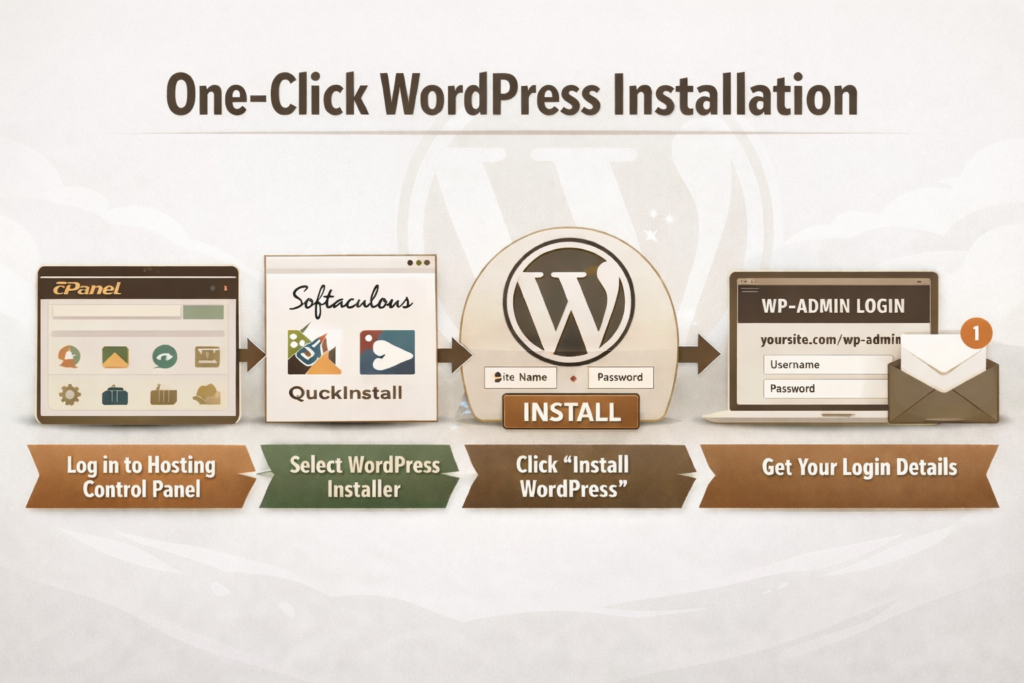
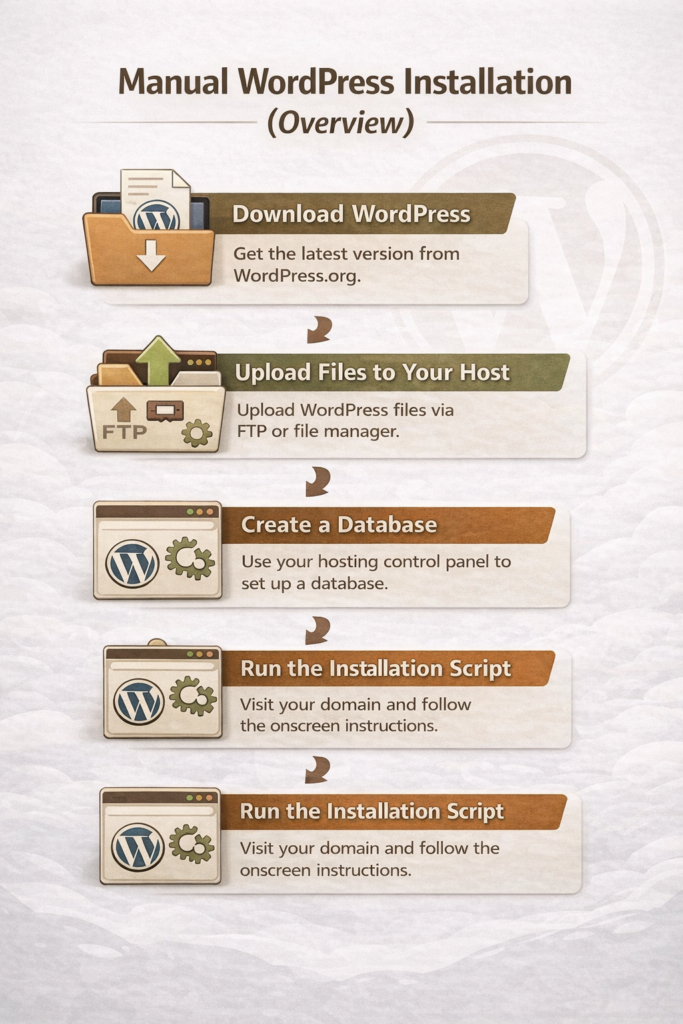
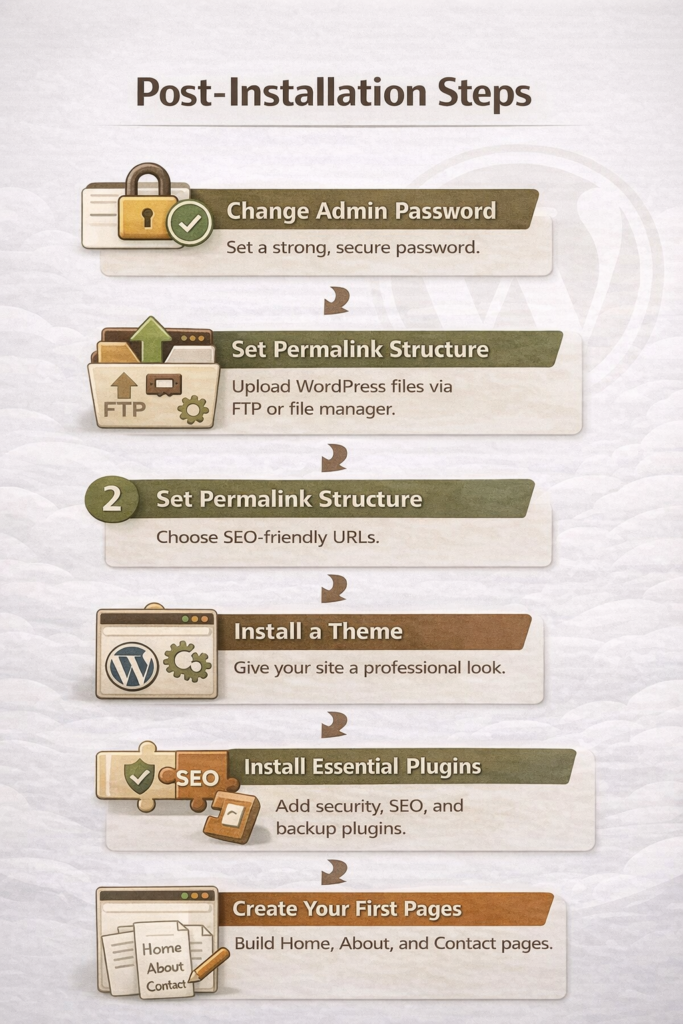
In this guide, I’ll walk you through simple, step-by-step instructions—from one-click installation to a manual overview—and show you exactly what to do immediately after WordPress is installed. By the end, you’ll have a secure, functional site ready to customize and grow.
Following these steps ensures your WordPress site is secure, functional, and ready to grow.
Final Thoughts
Installing WordPress can feel intimidating at first, especially when you’re not sure what the “next step” is after signing up for hosting. The good news is that most beginners can get up and running quickly using a one-click installation, and even the manual option is manageable when you understand the process at a high level.
Once WordPress is installed, the real work begins—setting up your site, securing it, and creating content that serves your readers well. Take your time, follow the steps in this guide, and remember that you don’t need to do everything perfectly on day one. A simple, functional site is far better than waiting indefinitely for the “perfect” setup.
The best hosting for beginner WordPress blogs is one that’s easy to use, affordable, and backed by reliable support, so you can focus on learning how to blog, not fixing technical issues.
Post contains affiliate links.
When you’re starting a blog for the first time, hosting can feel like an overwhelming decision. Every company promises speed, security, and “the best WordPress experience,” but no one really explains what matters for beginners. Many new bloggers sign up for a host without realizing how confusing the setup can be or how much prices increase after the first year.
My goal is to help you build a solid foundation without unnecessary stress. Your hosting choice plays a big role in how smooth your WordPress experience will be, especially in the early stages when you’re learning the basics and building confidence.
In this guide, we’ll walk through the best hosting for beginner WordPress blogs, sharing honest pros and cons, beginner-friendly recommendations, and what to look for so you can choose a hosting provider that supports your blog as it grows.
What Beginner WordPress Bloggers Need From a Hosting Provider
When you’re new to blogging, hosting should make WordPress feel simple. It shouldn’t be stressful. The best WordPress hosting for beginners focuses on ease, support, and value instead of advanced features you won’t use yet.
Ease of Setup (1-Click WordPress Install, Dashboards)
Beginner-friendly hosting should make getting started quick and simple. Look for a 1-click WordPress install and a clean dashboard that’s easy to understand. You shouldn’t need technical knowledge just to publish your first post.
Price vs. Long-Term Value
Many hosting plans look cheap at first, but become expensive when it’s time to renew. The best WordPress hosting for beginners is affordable up front and reasonably priced long term. Always check renewal rates before signing up.
Customer Support for Non-Tech Users
Good support is important. You want to have someone helpful available when something goes wrong. Look for a hosting provider that offers 24/7 support with clear, patient answers, especially through live chat. You shouldn’t feel embarrassed about asking basic questions.
Performance Basics (Speed, Uptime, Security)
You don’t need advanced performance tools as a beginner, but the basics matter. Good hosting should keep your site fast, online, and secure. Features like free SSL, reliable uptime, and basic security protection are essential from day one.
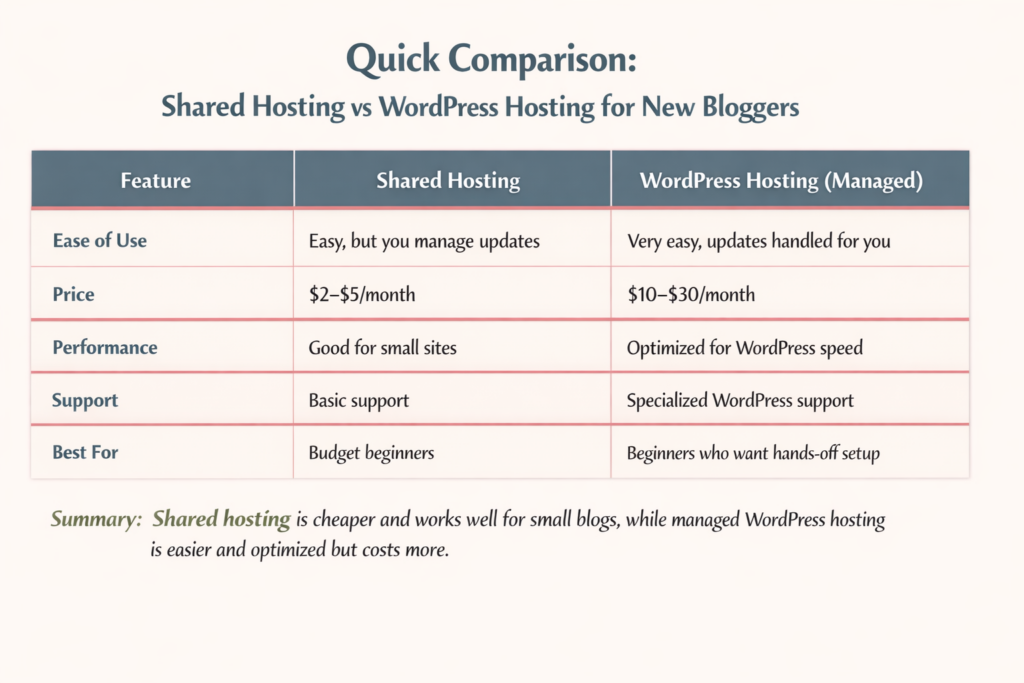
Quick Comparison: Best WordPress Hosting for Beginners
Starting a WordPress blog can be confusing, especially when you see all the hosting options. Let’s break down the most common types so you can make the best choice for your first blog.
Which Option Is Best If You’re Just Starting Out?
If you’re just learning and want to keep costs low, shared hosting is usually enough. If you want the simplest setup, don’t mind paying more, and want WordPress handled automatically, managed WordPress hosting is worth it.
Best Hosting for Beginner WordPress Blogs — Top Picks Reviewed
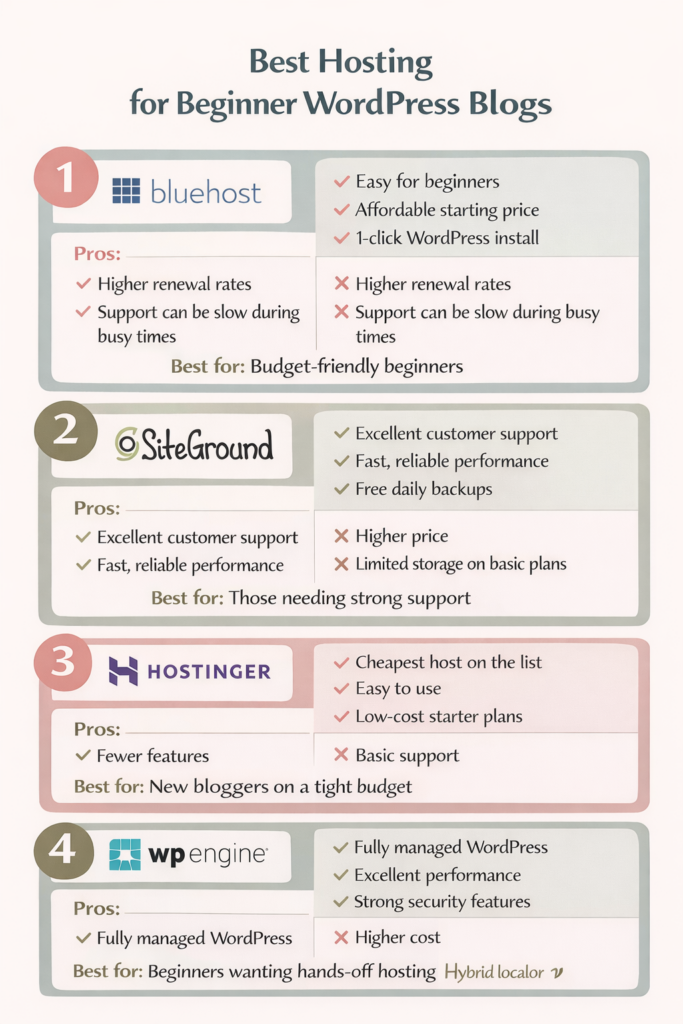
Not all hosting is created equal, especially for beginners. Here’s a quick look at the most popular options for new WordPress bloggers, with honest pros and cons to help you choose the right one for your needs.
Best for: Beginners who want strong support and reliable performance.
Hostinger — Cheapest WordPress Hosting for Beginners
Pros:
Very low starting price
Easy WordPress setup
Simple control panel
Cons:
Fewer features than higher-tier hosts
Support not as extensive as SiteGround or WP Engine
Best for: Bloggers starting with minimal investment who want to keep costs low.
WP Engine — Is Managed WordPress Hosting Worth It for Beginners?
Pros:
Fully managed WordPress hosting (updates, backups handled for you)
Excellent performance and security
Focused WordPress support
Cons:
Higher cost than shared hosting
Overkill for very small or hobby blogs
Best for: Bloggers who want a hands-off experience and have the budget for premium support.
WordPress Hosting Pros and Cons for Beginners
Choosing the right WordPress hosting can make or break your first blogging experience. Here’s a quick look at the main advantages and disadvantages for beginners so you can make a decision you can feel confident with.
Pros of Beginner-Friendly WordPress Hosting
Easy setup: Many hosts offer 1-click WordPress installation, so you can start blogging quickly.
Beginner-focused support: 24/7 chat and guided tutorials help you solve problems fast.
Optimized performance: Good hosts keep your site fast, secure, and reliable.
Affordable options: Shared hosting or starter plans make it easy to start on a budget.
Built-in tools: Features like free SSL, daily backups, and simple dashboards simplify site management.
Cons New Bloggers Should Be Aware Of
Renewal rates can jump: A lot of hosts offer low introductory prices that increase after the first term.
Overwhelming choices: Too many features or tiers are confusing.
Limited storage or bandwidth: Budget plans may restrict space or traffic as your blog grows.
Learning curve remains: Even beginner-friendly hosts still require some technical steps, like installing themes or plugins.
Support limits: Some budget hosts offer basic support, which may be slower or less detailed than premium options.
Common Hosting Mistakes Beginner Bloggers Make
Even with the best WordPress hosting for beginners, it’s easy to make mistakes that can slow down your blog or cost more than expected. Here are the most common pitfalls and how to avoid them.
Choosing Price Over Support
Sometimes new bloggers pick the cheapest host without considering support. If something breaks and help is slow, a low price can quickly cost you hours of frustration. Choose a host that balances affordability with responsive, beginner-friendly support.
Ignoring Renewal Rates
Introductory pricing can be tempting, but most hosts raise their rates after the first year. Always check the renewal price before signing up so you won’t be surprised later.
Overbuying Features You Don’t Need
Some hosting plans include fancy extras like advanced caching, staging sites, or premium security. As a beginner, these features can be confusing and unnecessary. Start simple. You can always upgrade later.
Skipping Backups or Security Checks
Even beginner-friendly hosting can’t protect you from mistakes or attacks if you don’t enable backups or security measures. Make sure your host offers automatic backups and SSL certificates, and learn the basics of WordPress security.
How to Choose the Best WordPress Hosting for Beginners (Step-by-Step)
Don’t stress over choosing the best hosting for beginner WordPress blogs. Don’t let it overwhelm you! Focus on the basics, and you’ll find a host that supports your blog instead of slowing you down.
1. Start With Your Blog Goals
What do you want from your blog? Do you just want a hobby blog? Are you planning to grow a full-time site? Your goals will determine whether shared hosting is enough or if managed WordPress hosting makes more sense for you.
2. Decide How Much Tech You Want to Handle
Some hosts handle everything for you, like updates and security. Others give you more control but require hands-on management. Choose the option that matches your comfort level with WordPress and technical tasks.
3. Match Hosting to Your Budget and Growth Plans
Look at both the starting price and renewal cost. Make sure the plan gives you room to grow, including enough storage, traffic allowance, and essential features like SSL certificates and backups.
4. Check Support and Resources
Even the best host is useless if you get stuck and can’t get help. Beginner-friendly hosting should offer 24/7 support, live chat, and clear tutorials to guide you through setup and troubleshooting.
Final Thoughts
The best WordPress hosting for beginners balances ease of use, affordability, and support. Take your time, compare options, and choose a host that makes blogging fun, not stressful!
Honestly, choosing a domain name for my blog was the hardest decision I had to make about blogging! I wanted it to be something that was easy to remember and reflected exactly what my blog was about.
Everything I came up with was either taken, sounded too clever, or was too boring. Plus, I wanted something that I was going to stick with and not outgrow within a year or two.
Since your domain name becomes your blog’s permanent home, it’s not a decision you want to rush.
Guess what: You don’t need the perfect domain name. You need a strategic one.
This guide will walk you through how to choose a domain name for your blog, including common mistakes to avoid, branding vs. SEO tradeoffs, and when keywords help (or hurt) your long-term growth.
*Post may include affiliate links.
What a Good Blog Domain Name Actually Does
Your domain name should:
Be easy to remember
Be easy to spell
Reflect your blog’s purpose or brand
Give you room to grow
What it does not need to do is explain everything you’ll ever write about.
A lot of bloggers regret their domain name because they chose something too narrow, too trendy, or too SEO-focused without thinking long-term.
Here are some clever examples based on the type of niche your blog is about:
Homesteading: TheGentleHomestead.com
Simply Living: RootedatHome.com
Writing: QuietDraft.com
Crafts: TheIntentionalCrafter.com
Health & Wellness: BalancedByDesign.com
Personal Finance: CalmMoneyHabits.com
Frugal Living: LivingOnLess.com
Parenting & Family Life: GrowingTogetherHome.com
Education: TheCuriousTeacher.com
Or you could simply choose a domain name by using your name. Or mix your name with a simple description of what your blog is about: MichelleMillerProofreading.
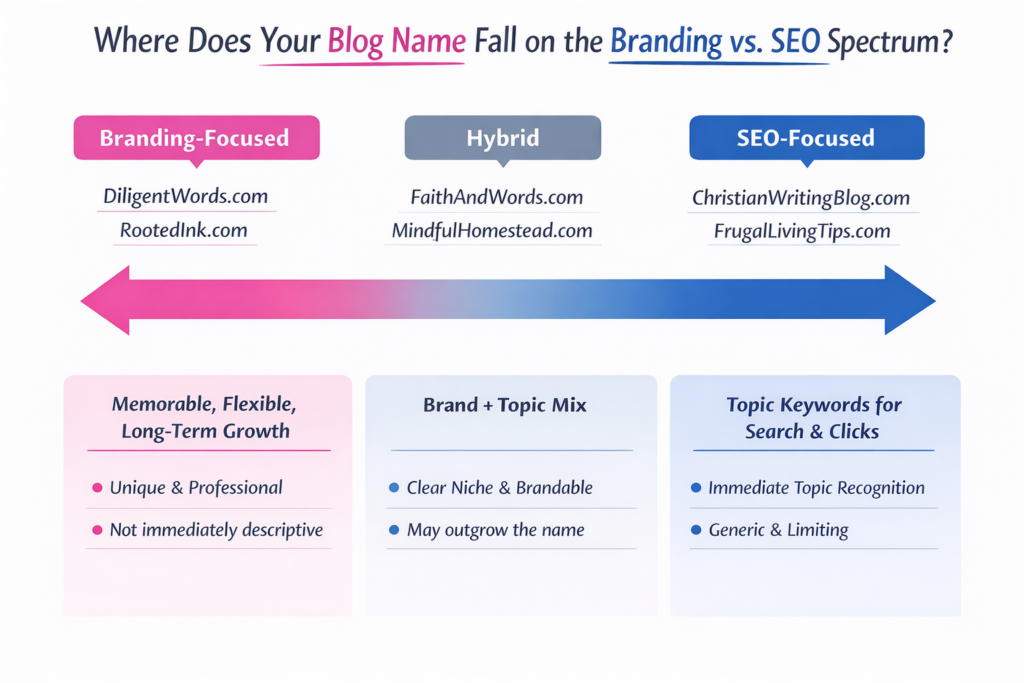
Branding vs. SEO: The Tradeoff You Need to Understand
This is where most bloggers get stuck when they sit down to choose a domain name. Should you go for something that immediately signals their topic for search engines, or choose something that feels memorable? It’s important to understand the difference between branding and SEO.
What Branding-Focused Domains Do
A brand-focused domain is designed to be memorable, flexible, and unique. It tells readers who you are, not just what you write about. These names are easy to say out loud, look professional, and give you room to expand your blog in the future.
Examples:
DiligentWords.com – works for writing, editing, or teaching.
RootedInk.com – broad enough to cover multiple content types while still feeling creative.
The benefit: Branding domains age well. Even if your blog topic evolves, your name still makes sense.
The tradeoff: It may not immediately tell a new visitor exactly what your blog is about. You’ll need strong messaging elsewhere—like your tagline, About page, or content titles.
What SEO-Focused Domains Do
An SEO-focused domain leans on keywords to signal your topic. These often describe exactly what the blog covers, which can help with search clarity and click-throughs early on.
Examples:
FrugalLivingTips.com – instantly communicates the blog’s focus.
ChristianWritingBlog.com – makes the niche crystal clear.
The benefit: Clear keyword signaling can help attract the right audience quickly and may give a small boost in search visibility.
The tradeoff: These domains can feel generic, limit your growth if you expand topics, and make it harder to stand out in a crowded market.
How to Decide Which Way to Go
Think of it as a range rather than an either/or choice:
If your goal is long-term brand recognition, prioritize branding.
If your goal is immediate search clarity, keywords can help, but don’t overstuff your domain.
A hybrid approach works too: blend a soft keyword into a brandable name (e.g., FaithAndWords.com).
Tip: Search engines care far more about quality content, structure, and consistency than your exact domain name. Prioritize readability, memorability, and brand potential. SEO will follow if your content is strong.
When Keywords in a Domain Name Help—and When They Hurt
If used wisely, keywords can still be useful.
Keywords Help When:
They naturally fit your brand name
They describe your core topic without boxing you in
They don’t make the domain long or awkward
Keywords Hurt When:
They make the domain clunky or hard to remember
They lock you into a single content angle
They sound like every other blog in your niche
If your domain reads like a search query instead of a brand, that’s a red flag.
This is one of the easiest mistakes to avoid when you choose a domain name, and one of the most common. Hyphens and numbers may seem like a quick fix when your preferred domain is taken, but they usually create more problems than they solve.
Your domain name should be easy to remember, type, and share. Hyphens and numbers work against all three.
Avoid Hyphens Because:
They’re hard to say out loud. If you ever tell someone your blog name in conversation, on a podcast, or during a presentation, hyphens instantly add friction. “It’s myblog dash name dot com” is awkward. And easy to forget.
People forget where they go. Even when someone hears your domain correctly, they often forget whether there was a hyphen or where it belongs. That confusion sends potential readers to the wrong site, or nowhere at all.
They increase the risk of typos. Hyphens make domains harder to type quickly, especially on mobile devices. More keystrokes mean more opportunities for errors, which can cost you traffic and credibility.
Avoid Numbers Because:
Are they spelled out or numeric? When someone hears your domain name, they have to guess: is it “five” or “5”?
They confuse readers. Numbers interrupt the natural flow of a name and make it harder to remember. A domain should roll off the tongue.
They often look spammy or dated. Domains with numbers are commonly associated with low-quality sites, temporary projects, or marketing shortcuts. Even if your content is excellent, the name can create an unnecessary trust barrier.
How to Generate Blog Domain Name Ideas
If you’re stuck, try these approaches:
Combine two relevant concepts (faith + writing, home + simplicity)
Use metaphors or imagery related to your topic
Look for words that reflect tone, not just topic
Start with your name if personal branding makes sense
Write down 10–20 ideas before checking availability. Walk away for a little while, or even a day or two, and come back to the list later. That way, you see it with fresh eyes, and the name you thought you liked yesterday may not be the one you love today.
Domain ownership: Some platforms offer a free domain as part of their plan, but there’s usually some strings attached. You may not fully own the domain, or it may be tied to the platform in a way that makes moving your site later more complicated.
Customization and branding: Your platform determines how much control you have over your site’s design, layout, and functionality. If your domain name is brand-focused, you’ll want a platform that allows you to fully customize how that brand is presented.
Long-term flexibility: Many bloggers outgrow their first platform. If you choose a platform that limits monetization, plugins, or site structure, your domain can feel trapped, even if the name itself is solid.
A Simple Domain Name Checklist
Before you buy, ask yourself:
Can I say this out loud without explaining it?
Would I still like this name in five years?
Does it give me room to grow?
Is it easy to spell and type?
Does it sound like a brand—not a keyword list?
If you can say yes to most of these, you’re on the right track.
Final Thoughts
Choosing a domain name doesn’t have to be stressful, but it should be intentional.
You’re not just picking a URL. You’re choosing the foundation your blog will grow on. Aim for clarity, flexibility, and longevity, and you’ll save yourself a rebrand down the road.
Years ago, when I started my first blog, I remember thinking, Why are there two WordPresses? I Googled: “How do I start a blog,” and somehow ended up buried under tons of articles about WordPress.com vs WordPress.org. Every one of them seemed to assume I already knew what hosting was, what plugins did, and why one option cost money while the other didn’t. I just wanted to write.
What made it more frustrating was that everyone had an opinion. Some people swore WordPress.com was easier. Others insisted WordPress.org was the only “real” way to blog.
But, the deeper I dug, the more the question shifted from “How do I start a blog?” to “WordPress.com or WordPress.org—which one am I supposed to choose?”
Are you feeling that same confusion right now? These two platforms may share a name, but they are designed for very different types of bloggers and website owners. Choosing the wrong one can limit you to constraints you didn’t even know existed, while selecting the right one can make everything that follows much smoother.
In this guide, I will walk you through WordPress.com vs WordPress.org in plain language—what they are, how they differ, and who each one is really for—so you can confidently decide which type of WordPress is the right foundation for the blog or website you want to build.
*post may contain affiliate links
What Is WordPress.com?
WordPress.com is a hosted blogging platform. That means everything you need to run your site is handled for you. You do not have to buy hosting, install software, or manage technical settings. You simply create an account, pick a design, and start writing.
WordPress.com bundles everything together for you:
Hosting (where your website lives)
Security
Software updates
Backups
Basic site maintenance
Because it is all built in, there is nothing for you to install. You log in through your browser and work on your site, much like using a social media platform or an online writing tool.
The free plan lets you start a blog with very little setup, but it comes with limits. Your site will have WordPress branding, a long web address (like yourblog.wordpress.com), and fewer features.
Paid plans give you more control. You can use a custom domain (like yourblog.com), remove WordPress ads, and unlock more design and business tools. The higher the plan, the more features you get.
Who Owns the Site?
With WordPress.com, you do not completely own your website. WordPress hosts it for you and controls the platform. This means they can set rules about what you can post, how you can make money, and which features you can use.
Your content belongs to you, but the website itself lives on their system.
What You Can and Cannot Customize
WordPress.com allows some design changes, but it is limited. You can:
Choose from approved themes
Change colors and fonts
Add basic pages and menus
You cannot:
Install most plugins
Edit core site files
Fully customize how the site works
This keeps things simple, but it also limits how much your site can grow.
Why Beginners Are Drawn to WordPress.com
Many beginners choose WordPress.com because it feels easy and safe. There is no hosting to set up, no software to install, and nothing to maintain. If you just want to start writing and do not want to deal with tech, WordPress.com can feel like the quickest path forward.
However, that simplicity comes with trade-offs, which is why it is important to understand how it compares to WordPress.org before you choose.
What Is WordPress.org?
WordPress.org is not a company, and it is not a paid blogging service. It is the home of self-hosted WordPress, which means you download the WordPress software and install it on your own web hosting. This is why people often call it self-hosted WordPress.
With WordPress.org, you are building your website on space you rent from a hosting company. WordPress is the software that runs the site, but you control everything.
This setup gives you full control over how your site looks, how it works, and how it grows.
What Is Hosting?
Think of hosting as the land where your website lives. Your blog files, images, and content have to be stored somewhere so people can see them online. A hosting company provides that space and keeps your site available on the internet.
With WordPress.org hosting, you choose the company that holds your site, and you can move it, upgrade it, or change providers anytime. This is a big difference from WordPress.com, where everything is locked into their system.
Why Most Professional Websites Use WordPress.org
Most professional bloggers, businesses, and online stores use WordPress.org because it gives them freedom and control. You can:
Install any WordPress plugin
Customize your site however you want
Optimize for SEO
Run ads, sell products, or build an email list
Change hosts as your site grows
This is why WordPress.org is often called the best option for people who want to turn their blog into something bigger over time.
WordPress.com vs WordPress.org: The Main Difference
WordPress.com vs WordPress.org can be very confusing. The easiest way to understand it is this:
WordPress.com is a hosted platform. Everything is handled for you—hosting, updates, security, and backups. You log in and write, but you are limited in customization and control.
WordPress.org is self-hosted. You download the WordPress software and install it on your own hosting. You own your website, choose your themes and plugins, and can fully customize your site.
Think of it like renting versus owning:
WordPress.com is like renting an apartment. The landlord handles maintenance, but you must follow their rules.
WordPress.org is like owning a house. You make all the decisions, but you are responsible for maintenance and upgrades.
Why This Difference Matters
Choosing the right platform affects everything else about your blog or website:
Customization: With WordPress.org, you can install any plugin or design your site however you want. WordPress.com is more limited.
Monetization: WordPress.org lets you run ads, sell products, and use affiliate links freely. WordPress.com has restrictions unless you pay for higher plans.
SEO and Growth: WordPress.org gives you full control over SEO tools, site speed, and content structure. WordPress.com is easier to start, but it can limit your growth.
Understanding the differences early saves headaches later. If your goal is a simple hobby blog, WordPress.com might be enough. But if you want a blog that grows, attracts traffic, and can eventually make money, WordPress.org is usually the better choice.
Who WordPress.com Is Really For
Not everyone needs full control over their website. WordPress.com is designed for people who want a simple, low-maintenance way to get online. It is perfect for those who just want to write and publish without worrying about hosting, plugins, or technical details.
Here are the types of people who often choose WordPress.com:
Hobby bloggers – If you’re blogging for fun and don’t care about growing a big audience, WordPress.com is an easy place to start.
Personal journals – People who want to share thoughts, experiences, or family updates without needing a professional website often find WordPress.com ideal.
People who never want to touch tech – WordPress.com handles hosting, backups, and updates for you, so you can focus entirely on writing.
Writers who just want to publish – If your goal is simply to put your content online and you don’t care about SEO, traffic, or monetization, WordPress.com covers all the basics.
In other words, WordPress.com is for anyone who wants a simple, hassle-free blogging experience. It’s easy to start, beginner-friendly, and lets you focus on writing rather than technical setup.
Who WordPress.org Is Really For
If you want your blog or website to grow beyond just writing, WordPress.org is usually the better choice. This platform is for anyone who is serious about building traffic, connecting with an audience, and turning their site into a long-term asset.
Here’s who often benefits most from self-hosted WordPress (WordPress.org):
Bloggers who want traffic, email lists, or income – WordPress.org gives you full control over SEO, email marketing, and monetization, so you can grow your audience and turn your blog into a source of revenue.
Freelancers, creators, and business owners – You can customize your site, run ads, sell products or services, and create a professional online presence.
Anyone serious about growing a brand or platform – With WordPress.org, your website is fully yours. You choose your host, install plugins, and scale your site as your goals expand.
Build email lists to connect directly with your audience
Sell products or services without restrictions
Maintain long-term site ownership, giving you freedom and flexibility to change hosts, redesign your site, or expand features
In other words, if you want more than a simple blog (if your goal is growth, control, and the ability to monetize), WordPress.org is the platform that makes it possible. This is why many professional bloggers and small businesses choose it over WordPress.com.
Which One Should You Choose?
When it comes to WordPress.com vs WordPress.org, the right choice depends on your goals, skills, and how much control you want over your site. Here’s a simple framework to help you decide:
If you want simplicity: Choose WordPress.com. It’s easy to start, beginner-friendly, and takes care of hosting, security, and updates for you. You can focus entirely on writing without worrying about technical setup.
If you want growth: Choose WordPress.org. This self-hosted platform gives you full control over your site, allows you to install plugins, customize your design, optimize for SEO, build email lists, and monetize your blog. It’s the better option if you want to grow your audience or turn your blog into a long-term platform.
A Common Beginner Mistake
As a new blogger, I started on WordPress.com because I thought it was easier. I only wanted to write for fun at first, but then I started gaining a lot of followers. I realized that I could start making money with my blog, and I wanted more control and features. I needed to move my site to WordPress.org, which was complicated, time-consuming, and a little costly. Plus, I had heard horror stories from other bloggers who did this and lost all their posts.
By thinking ahead and choosing the right platform from the start, you can avoid headaches and set your blog up for long-term success. Choosing between WordPress.com or WordPress.org early ensures your site can grow with your goals, rather than holding you back.
Final Thoughts
Choosing between WordPress.com vs WordPress.org is one of the most important decisions you’ll make when starting a blog. There isn’t a “one-size-fits-all” answer. It all comes down to your goals, how much control you want, and how far you want your blog or website to grow.
If you want simplicity, quick setup, and minimal technical work, WordPress.com is a solid choice. It’s perfect for hobby bloggers, personal journals, or anyone who just wants to write without worrying about hosting or plugins.
If your goal is growth, traffic, and long-term ownership, WordPress.org is usually the better option. Self-hosted WordPress gives you freedom to customize, optimize for SEO, build email lists, sell products, and fully control your site as your blog or business expands.
The key is to make this decision early, because switching later from WordPress.com to WordPress.org can be tricky and time-consuming.
Take a minute to think about what you want your blog to look like six months, a year, or even five years from now. By choosing the right platform from the start, you’re setting yourself up for a smoother journey and a blog that can grow with your goals.
For a step-by-step guide on setting up your blog after you make this decision, check out my guide: How to Start a Blog from Scratch. It walks you through everything from domain names to writing your first post.
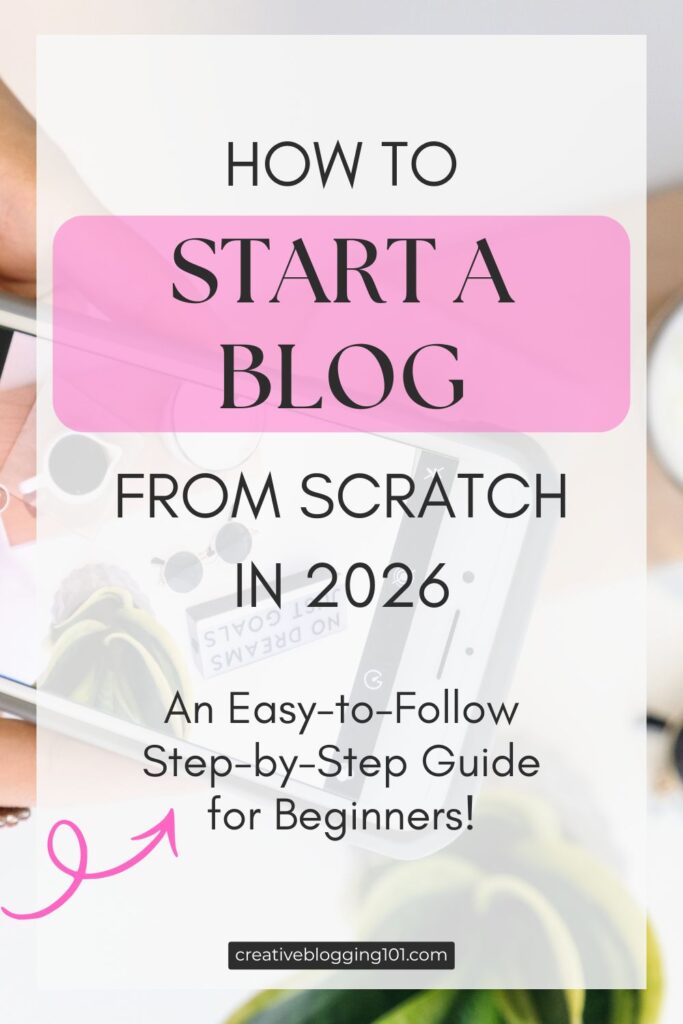
Starting a blog can feel overwhelming, especially if you’ve never done it before and aren’t sure where to begin. If you’re wondering how to start a blog from scratch in 2026, you’re not alone. With so many platforms, tools, and opinions available, it’s easy to get stuck before you even publish your first post.
I’ve got good news! Blogging is still one of the most accessible ways to build an online presence, share your expertise, and create an income stream. You don’t need to be tech-savvy, have a large following, or spend months planning. What you do need is a clear, beginner-friendly roadmap that walks you through each step without the confusion.
In this step-by-step guide, you’ll learn exactly how to start a blog from scratch, even if you have no prior experience. We’ll cover what’s changed about blogging in 2026, the essential tools you actually need, and the foundational steps that set your blog up for long-term growth—so you can move forward with confidence and clarity.
What is a Blog?
If you’re new to blogging, it helps to understand what a blog really is. A blog is a website where you post written content on a regular basis. In 2026, blogs are not just online journals. They are places where people share ideas, teach others, and build trust with readers over time.
Many beginners think they need to be great writers, tech experts, or have a large audience before they start a blog. Not true. You don’t need special skills or experience to begin. If you can explain something you know, share a story, or help someone solve a problem, you already have enough to start.
Starting a blog “from scratch” does not mean doing everything at once. It means picking one main topic, setting up a simple website, and adding content as you go. You don’t need a perfect design or dozens of posts right away. What matters most is getting started and staying consistent.
Blogging is a good choice for beginners because it is flexible. You can blog as a hobby, to support a business, or to earn extra income over time. You can work at your own pace and grow your blog step by step.
If you’ve been waiting until you feel ready, now is a good time to start. Every blogger begins as a beginner. The best way to learn blogging is by starting and learning as you go.
Blogging for Beginners in 2026: What’s Changed
When I started blogging many years ago, it was more as a hobby. It was fun to write about things I was doing, like keeping a journal. But as my little blog grew, I learned that blogging has changed a lot over the years. However, the main idea is still the same: helpful content wins. In 2026, blogs are less about posting often and more about creating content that answers real questions and solves real problems. Readers expect clear, useful information, and search engines reward blogs that deliver it.
AI now plays a bigger role in blogging, especially for research, outlines, and editing support. However, AI does not replace original ideas or personal experience. Search engines are focused on search intent, which means they care more about how well your content matches what someone is actually looking for—not just which keywords you use. Good SEO today is about clarity, structure, and usefulness.
Long-form content still matters because it allows you to cover a topic fully in one place. Well-written, in-depth posts tend to rank better, build trust with readers, and keep people on your site longer. One strong, helpful post can outperform several short, rushed ones.
For beginners, the focus should be simple: choose one clear topic, write helpful posts, and learn the basics of SEO without overthinking it. You do not need to master every tool or trend. Start with quality content, consistency, and a willingness to improve as you go.
How to Start a Blog from Scratch Step by Step
Learning how to start a blog from scratch is easier when you break the process into simple steps. Don’t try to do everything at once. It will cause you to become overwhelmed, stressed, and burned out, which is why a lot of bloggers quit in the very beginning. This section walks you through each part in order, from choosing your topic to setting up your site.
Step 1 – Choose a Blog Niche
A blog niche is the main topic your blog focuses on. Instead of writing about everything, you choose one general area so readers and search engines know what your blog is about. A clear niche makes it easier to attract the right audience and decide what to write about.
Beginner-friendly niche examples include:
personal finance basics
simple home organization
beginner fitness
easy recipes
parenting tips
homesteading
faith-based encouragement
learning a new skill
The best niches are ones you’re interested in and can write about consistently, even as you continue learning.
A common mistake beginners make is choosing a niche that is too broad, like “lifestyle” or “everything I’m interested in.” Another mistake is picking a niche only because it seems profitable, without any real interest in the topic. Focus on clarity, not perfection. You can always narrow your niche as your blog grows.
Step 2 – Choose the Right Blogging Platform
A blogging platform is the tool you use to create and manage your blog. Some popular options for beginners include WordPress, Wix, Squarespace, and Blogger. Each has its pros and cons, but the right platform depends on your goals, budget, and technical comfort level.
WordPress is the most popular choice for beginners who want flexibility and long-term growth. It’s easy to use, works with many themes and plugins, and gives you control over your blog as it grows. You don’t need to be a developer to get started, and there are plenty of tutorials to guide you. (It’s what I use for all my blogs and have been using for years.)
You can start with a free platform, which is easy and low-risk, but free blogs often come with limitations, like restricted design options, ads, and less control over your domain. A self-hosted blog (like WordPress.org) costs a little more, but it gives you full control, a professional domain name, and more opportunities to grow and monetize your blog.
For beginners, starting with a self-hosted WordPress blog is usually the best long-term choice.
Your domain name is your blog’s address on the web, like http://www.yourblogname.com. It’s one of the first things readers notice, so choosing the right one matters. A good domain is easy to remember, easy to spell, and reflects your blog’s focus.
When picking a domain, think about branding versus keywords. A brandable name is unique, catchy, and helps you stand out, while a keyword-focused name tells people (and search engines) exactly what your blog is about. You can combine both, but avoid long, confusing names.
Common mistakes include:
using numbers
using hyphens
using complicated words that are hard to type
copying another blog’s name
choosing something too trendy that might feel outdated quickly
Keep it simple, clear, and easy to remember so readers can find your blog without any trouble.
Once you come up with a name, you need to make sure the name you want is available. These sites offer a free domain name search:
Web hosting is the service that stores your blog’s files and makes them available online. It’s where your blog “lives”. Think of it as renting space on the internet for your blog. Without hosting, your blog won’t be visible to readers.
For beginners, all you need is a reliable, beginner-friendly hosting plan. Most hosting providers include one-click WordPress installation, email support, and basic security features—everything you need to get started without technical headaches. You don’t need the most expensive plan at first; a basic shared hosting plan is enough for a new blog. In terms of cost, beginner hosting usually runs between $3–$10 per month, depending on the provider and plan. Many providers also offer discounts for the first year. Choosing good hosting early can save you headaches later, so pick a reputable company that makes setup and support simple. (Many bloggers prefer BlueHost.)
Once you know how to start a blog from scratch, the next step is learning how to create a blog that can grow over time. This means more than just setting up a website. It’s about building a blog that looks professional, is easy to navigate, and is set up to attract readers from the start. A blog ready to grow has the right structure, essential pages, and a simple design that lets your content shine. By focusing on these basics early, you’ll save time and make it easier to expand your blog in the future.
Install WordPress and Essential Settings
Once you’ve chosen your hosting, it’s time to install WordPress. (WordPress makes creating and managing your blog easy.) Most hosting providers have a one-click WordPress installation, so you don’t need any technical skills. After installing, your blog will have a basic structure you can start customizing right away.
Here’s a simple setup checklist for beginners:
Choose a blog title and tagline
Set your preferred time zone and language
Check your permalink settings so your URLs are simple and easy to read (this is important!) To do this: in your WordPress dashboard, hover over “Settings” then click “Permalinks.” Choose “post name.” This gives you a better chance of ranking higher in search engines, plus makes it easier for readers to find your posts.
Add your first user account (usually your own)
It’s also important to protect your blog with basic security measures. Start with a secure password, limit login attempts, and install a simple security plugin if your host allows it. Don’t forget backups! These save a copy of your blog in case something goes wrong. Most hosts offer automatic backups, or you can use a free plugin to make sure your work is safe.
When setting up your first blog, how it looks is important, but it doesn’t need to be complicated. One of the blogging basics for beginners is keeping your design simple and easy to navigate while still looking professional.
Start by picking a theme, which is a ready-made template that controls the layout, colors, and fonts of your blog. Themes make it easy to get started, and you can make small customizations without touching any code. Avoid adding too many colors, fonts, or widgets, because overdesign can make your blog confusing for readers and can slow down your entire site.
I use a paid theme for all my websites from BluChic, and I love it! It’s easy to install, and everything is laid out for you, so all you have to do is change the text and images.
Your blog also needs to be mobile responsive, meaning it adjusts automatically to phones and tablets. A responsive design ensures your blog looks good and works well on any device.
By focusing on a clean, simple layout with just a few thoughtful customizations, you’ll create a blog that’s easy to read, professional, and ready to grow—an essential step in learning how to start a blog from scratch.
Create Essential Blog Pages
It’s important to add a few essential pages that help your readers understand your blog and trust your content. These pages make your blog feel complete and professional, even for beginners.
About Page: This is where you tell readers who you are and what your blog is about. Share a little about yourself, your goals, and why you’re writing. A clear About page helps visitors connect with you and your content.
Contact Page: Make it easy for readers, potential collaborators, or brands to get in touch. Include a simple contact form or your email address. A Contact page shows that you’re approachable and serious about your blog.
Privacy Policy / Disclaimer (Disclosure): These pages protect you and your readers. A Privacy Policy explains how you handle visitor information, while a Disclaimer or Disclosure covers things like advice or affiliate links. Even simple templates are enough for a new blog.
Adding these pages early gives your blog a strong foundation and shows readers that your site is trustworthy, organized, and ready to grow.
Beginner Blogging Guide: Writing Your First Posts
Now it’s time to talk about writing because a beginner blogging guide isn’t complete without tips on writing your first posts. Starting out can feel terrifying, but it’s easier than you think if you focus on simple, helpful content. And when you’re learning how to start a blog from scratch, you need to know every detail possible for long-term growth.
What to write first Start with posts that introduce your topic and share your knowledge or experience. You could write a “Welcome” post explaining your blog’s purpose, a post answering common questions in your niche, or a simple how-to guide. Your first posts don’t have to be perfect. They’re just a starting point.
How many posts to start You don’t need a huge library before going live. Aim for 3–5 quality posts so visitors have something to read when they arrive. This gives your blog enough content to feel useful while letting you add more posts consistently over time.
Basic SEO for beginners Use keywords naturally in your titles, headings, and a few times in the text. Add meta descriptions for each post and use descriptive image alt text. Don’t overthink it! Focus on helping your readers find value in your content.
Formatting for readability Break your text into short paragraphs, use headings and subheadings, and include bullet points or numbered lists when possible. A clean, easy-to-read layout keeps people on your blog longer and makes your content easier to understand.
Once your first posts are live, it’s time to focus on what comes next. These blogging basics for beginners will help you build momentum and grow your blog without feeling overwhelmed.
How Often to Publish Consistency matters more than quantity. Start with one or two posts per week or every other week—whatever you can manage without burning out. The key is to stick to a schedule so readers know when to expect new content.
Promoting your Blog (without overwhelm): Share your posts on social media, join niche communities, or connect with other bloggers. You don’t need to be on every platform. Just pick one or two that fit your audience and focus on them. Simple, steady promotion works better than trying to do everything at once.
Starting an Email List Early Even if your blog is new, begin collecting emails from day one. An email list helps you stay in touch with readers, share updates, and grow your audience. Offer a small freebie, like a checklist or guide, to encourage sign-ups.
I use Kit to send newsletters and emails to my subscribers. They have easy-to-use templates, which make emailing updates to your subscribers really fast and simple.
Tracking Basic Metrics Keep an eye on simple stats like page views, popular posts, and traffic sources. Free tools like Google Analytics or your hosting dashboard can help. Tracking metrics shows what works, so you can create more of the content your readers love.
Can You Make Money Blogging in 2026?
Can you actually make money from blogging? If you’re learning how to start a blog from scratch, it’s important to have realistic expectations. Blogging can make money, but it usually takes time, consistent effort, and a focus on providing value before income comes. Most new bloggers don’t see large profits right away, but even a small, steady income is possible as your audience grows.
Beginner Monetization Options Once your blog has a few posts and a growing audience, there are simple ways to start earning, including:
affiliate marketing (recommending products you use)
offering a small digital product like a guide or template
displaying ads through beginner-friendly networks
You don’t need a huge following to start testing these options.
What to Focus on Before Monetizing Before thinking about money, focus on building your blog’s foundation. This means creating helpful content, growing an email list, and learning basic SEO. A blog with engaged readers and a clear niche will naturally perform better when you introduce monetization.
Common Beginner Blogging Mistakes to Avoid
Starting a blog can be exciting, but beginners often make mistakes that slow their progress. Knowing what to watch out for can save you time and frustration. Avoiding these common mistakes helps you stay on track and build a blog that grows steadily over time.
Trying to do everything at once. Many new bloggers want to perfect their design, write dozens of posts, and master SEO all at the same time. Focus on one step at a time—set up your blog, publish a few posts, then improve as you go.
Ignoring SEO. Even a helpful blog won’t reach readers if no one can find it. Basic SEO, like using keywords naturally, writing clear headings, and adding meta descriptions, helps your content get discovered without being overwhelming.
Inconsistent publishing. Skipping weeks or months between posts makes it harder to build an audience. Pick a schedule you can stick to, even if it’s just one post per week, and stay consistent.
Giving up too soon. Blogging takes time. Many beginners quit before they see results. Growth comes from regular posting, learning from mistakes, and gradually improving your blog.
Frequently Asked Questions About Starting a Blog
Is blogging still worth it in 2026? Yes! Blogging is still a powerful way to share your ideas, build an audience, and even earn extra income. While social media is popular, blogs give you control over your content, help you establish authority, and allow your content to be discovered through search engines over time.
Can you start a blog for free? Yes, you can start a free blog on platforms like WordPress.com or Blogger. Free blogs are a good way to practice and learn, but they come with limitations, such as fewer design options, ads, and less control over your domain. For long-term growth, a self-hosted blog is usually a better choice.
How long does it take to make money? Making money from a blog usually takes time and consistent effort. Most beginners don’t earn much in the first few months. Depending on your niche, content, and promotion, it can take 6–12 months to start earning a steady income. Focus first on building helpful content and growing your audience.
How much does it cost to start a blog? You can start a blog for as little as $3–$10 per month for hosting, plus a domain name that typically costs around $10–$15 per year. Additional costs might include a premium theme or tools, but you can start with free resources and upgrade later as your blog grows.
Final Thoughts: How to Start a Blog From Scratch (Without Overwhelm)
Starting a blog can feel overwhelming and intimidating, but the most important step is simply to begin. Remember, you don’t need to have everything perfect from day one. Focus on progress, not perfection, and take things one step at a time. Learning how to start a blog from scratch isn’t as hard as you might think.
Pick a niche, set up your blog, write a few helpful posts, and learn as you go. Each post you publish, each page you create, and each small improvement you make brings you closer to a blog that grows and succeeds.
Blogging is a journey, and beginners can start small while building skills and confidence along the way. By following this beginner blogging guide and focusing on simple, practical steps, you can start your blog without overwhelm and create a site that’s ready to grow over time.
Now it’s your turn: take the first step, start writing, and watch your blog come to life.