You’ve signed up for web hosting, but now what? Now you need to install WordPress!
Knowing how to install WordPress is the next crucial step before your website or blog can go live. But it can be scary, especially if you’ve never done it before.
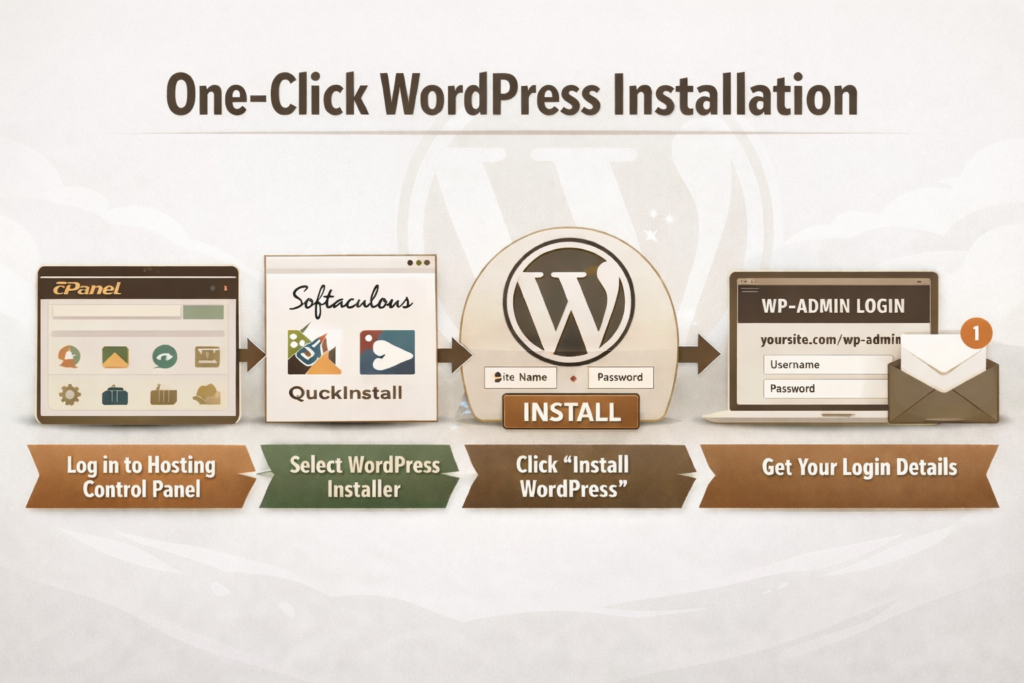
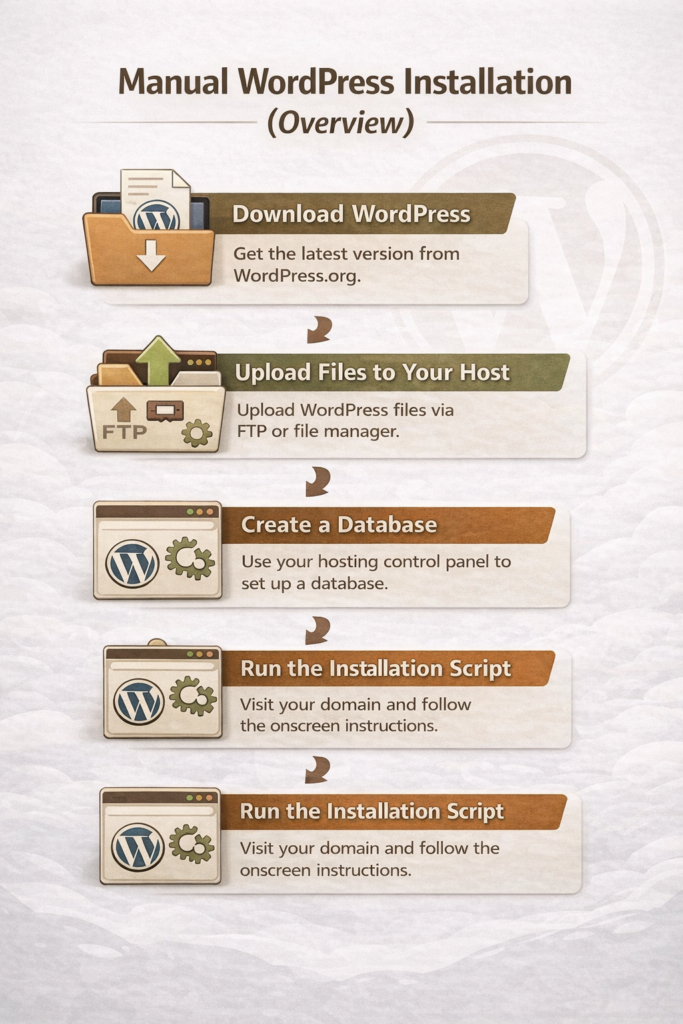
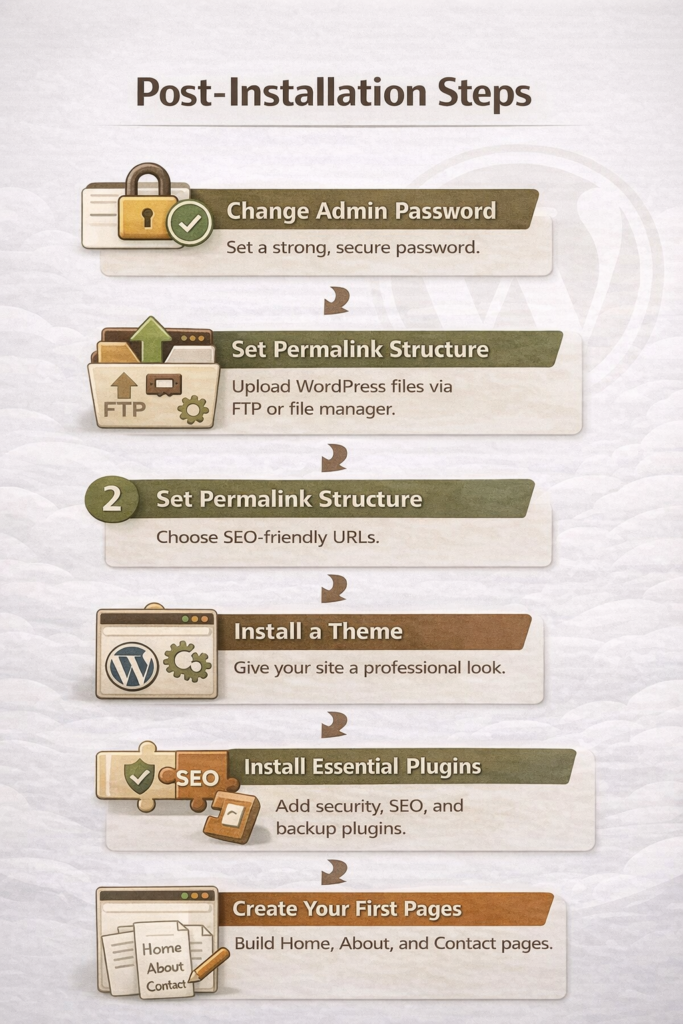
In this guide, I’ll walk you through simple, step-by-step instructions—from one-click installation to a manual overview—and show you exactly what to do immediately after WordPress is installed. By the end, you’ll have a secure, functional site ready to customize and grow.
Following these steps ensures your WordPress site is secure, functional, and ready to grow.
Final Thoughts
Installing WordPress can feel intimidating at first, especially when you’re not sure what the “next step” is after signing up for hosting. The good news is that most beginners can get up and running quickly using a one-click installation, and even the manual option is manageable when you understand the process at a high level.
Once WordPress is installed, the real work begins—setting up your site, securing it, and creating content that serves your readers well. Take your time, follow the steps in this guide, and remember that you don’t need to do everything perfectly on day one. A simple, functional site is far better than waiting indefinitely for the “perfect” setup.
The best hosting for beginner WordPress blogs is one that’s easy to use, affordable, and backed by reliable support, so you can focus on learning how to blog, not fixing technical issues.
Post contains affiliate links.
When you’re starting a blog for the first time, hosting can feel like an overwhelming decision. Every company promises speed, security, and “the best WordPress experience,” but no one really explains what matters for beginners. Many new bloggers sign up for a host without realizing how confusing the setup can be or how much prices increase after the first year.
My goal is to help you build a solid foundation without unnecessary stress. Your hosting choice plays a big role in how smooth your WordPress experience will be, especially in the early stages when you’re learning the basics and building confidence.
In this guide, we’ll walk through the best hosting for beginner WordPress blogs, sharing honest pros and cons, beginner-friendly recommendations, and what to look for so you can choose a hosting provider that supports your blog as it grows.
What Beginner WordPress Bloggers Need From a Hosting Provider
When you’re new to blogging, hosting should make WordPress feel simple. It shouldn’t be stressful. The best WordPress hosting for beginners focuses on ease, support, and value instead of advanced features you won’t use yet.
Ease of Setup (1-Click WordPress Install, Dashboards)
Beginner-friendly hosting should make getting started quick and simple. Look for a 1-click WordPress install and a clean dashboard that’s easy to understand. You shouldn’t need technical knowledge just to publish your first post.
Price vs. Long-Term Value
Many hosting plans look cheap at first, but become expensive when it’s time to renew. The best WordPress hosting for beginners is affordable up front and reasonably priced long term. Always check renewal rates before signing up.
Customer Support for Non-Tech Users
Good support is important. You want to have someone helpful available when something goes wrong. Look for a hosting provider that offers 24/7 support with clear, patient answers, especially through live chat. You shouldn’t feel embarrassed about asking basic questions.
Performance Basics (Speed, Uptime, Security)
You don’t need advanced performance tools as a beginner, but the basics matter. Good hosting should keep your site fast, online, and secure. Features like free SSL, reliable uptime, and basic security protection are essential from day one.
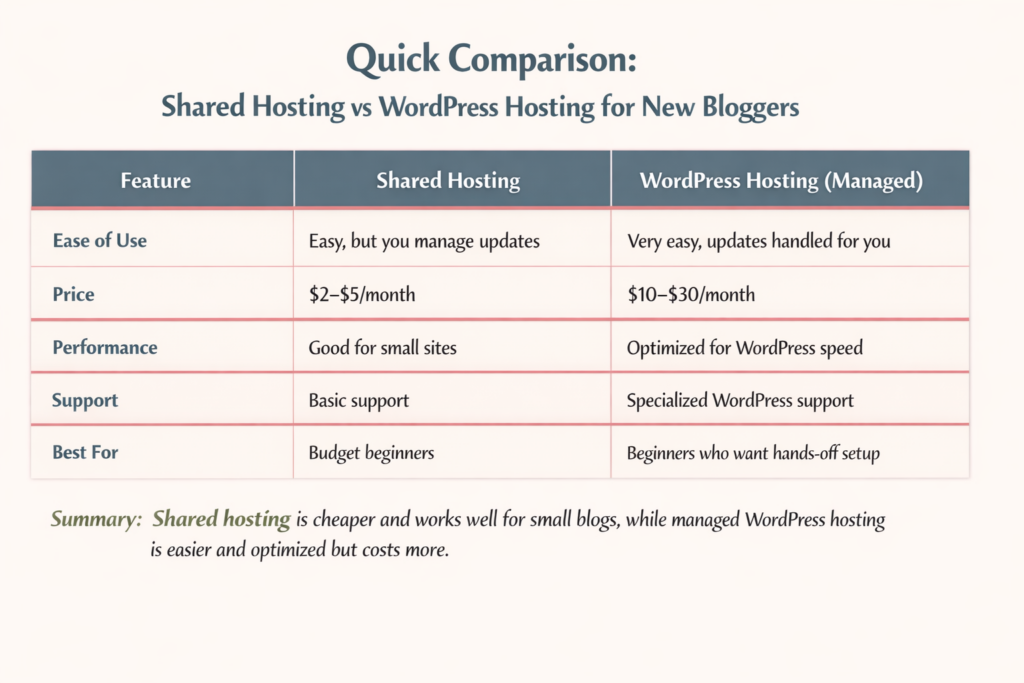
Quick Comparison: Best WordPress Hosting for Beginners
Starting a WordPress blog can be confusing, especially when you see all the hosting options. Let’s break down the most common types so you can make the best choice for your first blog.
Which Option Is Best If You’re Just Starting Out?
If you’re just learning and want to keep costs low, shared hosting is usually enough. If you want the simplest setup, don’t mind paying more, and want WordPress handled automatically, managed WordPress hosting is worth it.
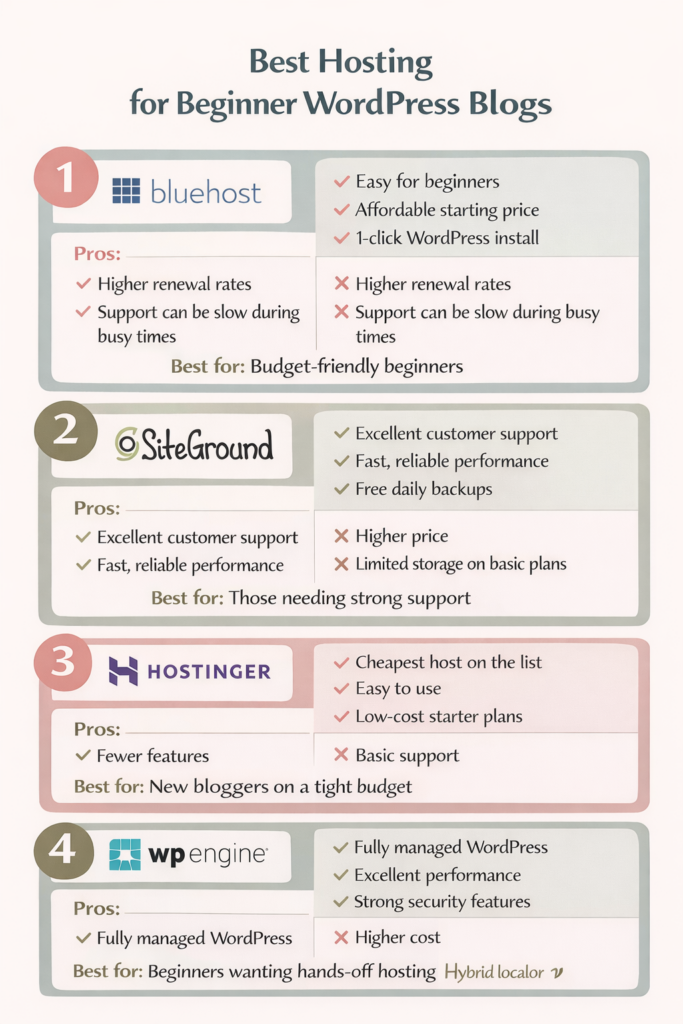
Best Hosting for Beginner WordPress Blogs — Top Picks Reviewed
Not all hosting is created equal, especially for beginners. Here’s a quick look at the most popular options for new WordPress bloggers, with honest pros and cons to help you choose the right one for your needs.
Best for: Beginners who want strong support and reliable performance.
Hostinger — Cheapest WordPress Hosting for Beginners
Pros:
Very low starting price
Easy WordPress setup
Simple control panel
Cons:
Fewer features than higher-tier hosts
Support not as extensive as SiteGround or WP Engine
Best for: Bloggers starting with minimal investment who want to keep costs low.
WP Engine — Is Managed WordPress Hosting Worth It for Beginners?
Pros:
Fully managed WordPress hosting (updates, backups handled for you)
Excellent performance and security
Focused WordPress support
Cons:
Higher cost than shared hosting
Overkill for very small or hobby blogs
Best for: Bloggers who want a hands-off experience and have the budget for premium support.
WordPress Hosting Pros and Cons for Beginners
Choosing the right WordPress hosting can make or break your first blogging experience. Here’s a quick look at the main advantages and disadvantages for beginners so you can make a decision you can feel confident with.
Pros of Beginner-Friendly WordPress Hosting
Easy setup: Many hosts offer 1-click WordPress installation, so you can start blogging quickly.
Beginner-focused support: 24/7 chat and guided tutorials help you solve problems fast.
Optimized performance: Good hosts keep your site fast, secure, and reliable.
Affordable options: Shared hosting or starter plans make it easy to start on a budget.
Built-in tools: Features like free SSL, daily backups, and simple dashboards simplify site management.
Cons New Bloggers Should Be Aware Of
Renewal rates can jump: A lot of hosts offer low introductory prices that increase after the first term.
Overwhelming choices: Too many features or tiers are confusing.
Limited storage or bandwidth: Budget plans may restrict space or traffic as your blog grows.
Learning curve remains: Even beginner-friendly hosts still require some technical steps, like installing themes or plugins.
Support limits: Some budget hosts offer basic support, which may be slower or less detailed than premium options.
Common Hosting Mistakes Beginner Bloggers Make
Even with the best WordPress hosting for beginners, it’s easy to make mistakes that can slow down your blog or cost more than expected. Here are the most common pitfalls and how to avoid them.
Choosing Price Over Support
Sometimes new bloggers pick the cheapest host without considering support. If something breaks and help is slow, a low price can quickly cost you hours of frustration. Choose a host that balances affordability with responsive, beginner-friendly support.
Ignoring Renewal Rates
Introductory pricing can be tempting, but most hosts raise their rates after the first year. Always check the renewal price before signing up so you won’t be surprised later.
Overbuying Features You Don’t Need
Some hosting plans include fancy extras like advanced caching, staging sites, or premium security. As a beginner, these features can be confusing and unnecessary. Start simple. You can always upgrade later.
Skipping Backups or Security Checks
Even beginner-friendly hosting can’t protect you from mistakes or attacks if you don’t enable backups or security measures. Make sure your host offers automatic backups and SSL certificates, and learn the basics of WordPress security.
How to Choose the Best WordPress Hosting for Beginners (Step-by-Step)
Don’t stress over choosing the best hosting for beginner WordPress blogs. Don’t let it overwhelm you! Focus on the basics, and you’ll find a host that supports your blog instead of slowing you down.
1. Start With Your Blog Goals
What do you want from your blog? Do you just want a hobby blog? Are you planning to grow a full-time site? Your goals will determine whether shared hosting is enough or if managed WordPress hosting makes more sense for you.
2. Decide How Much Tech You Want to Handle
Some hosts handle everything for you, like updates and security. Others give you more control but require hands-on management. Choose the option that matches your comfort level with WordPress and technical tasks.
3. Match Hosting to Your Budget and Growth Plans
Look at both the starting price and renewal cost. Make sure the plan gives you room to grow, including enough storage, traffic allowance, and essential features like SSL certificates and backups.
4. Check Support and Resources
Even the best host is useless if you get stuck and can’t get help. Beginner-friendly hosting should offer 24/7 support, live chat, and clear tutorials to guide you through setup and troubleshooting.
Final Thoughts
The best WordPress hosting for beginners balances ease of use, affordability, and support. Take your time, compare options, and choose a host that makes blogging fun, not stressful!
Years ago, when I started my first blog, I remember thinking, Why are there two WordPresses? I Googled: “How do I start a blog,” and somehow ended up buried under tons of articles about WordPress.com vs WordPress.org. Every one of them seemed to assume I already knew what hosting was, what plugins did, and why one option cost money while the other didn’t. I just wanted to write.
What made it more frustrating was that everyone had an opinion. Some people swore WordPress.com was easier. Others insisted WordPress.org was the only “real” way to blog.
But, the deeper I dug, the more the question shifted from “How do I start a blog?” to “WordPress.com or WordPress.org—which one am I supposed to choose?”
Are you feeling that same confusion right now? These two platforms may share a name, but they are designed for very different types of bloggers and website owners. Choosing the wrong one can limit you to constraints you didn’t even know existed, while selecting the right one can make everything that follows much smoother.
In this guide, I will walk you through WordPress.com vs WordPress.org in plain language—what they are, how they differ, and who each one is really for—so you can confidently decide which type of WordPress is the right foundation for the blog or website you want to build.
*post may contain affiliate links
What Is WordPress.com?
WordPress.com is a hosted blogging platform. That means everything you need to run your site is handled for you. You do not have to buy hosting, install software, or manage technical settings. You simply create an account, pick a design, and start writing.
WordPress.com bundles everything together for you:
Hosting (where your website lives)
Security
Software updates
Backups
Basic site maintenance
Because it is all built in, there is nothing for you to install. You log in through your browser and work on your site, much like using a social media platform or an online writing tool.
The free plan lets you start a blog with very little setup, but it comes with limits. Your site will have WordPress branding, a long web address (like yourblog.wordpress.com), and fewer features.
Paid plans give you more control. You can use a custom domain (like yourblog.com), remove WordPress ads, and unlock more design and business tools. The higher the plan, the more features you get.
Who Owns the Site?
With WordPress.com, you do not completely own your website. WordPress hosts it for you and controls the platform. This means they can set rules about what you can post, how you can make money, and which features you can use.
Your content belongs to you, but the website itself lives on their system.
What You Can and Cannot Customize
WordPress.com allows some design changes, but it is limited. You can:
Choose from approved themes
Change colors and fonts
Add basic pages and menus
You cannot:
Install most plugins
Edit core site files
Fully customize how the site works
This keeps things simple, but it also limits how much your site can grow.
Why Beginners Are Drawn to WordPress.com
Many beginners choose WordPress.com because it feels easy and safe. There is no hosting to set up, no software to install, and nothing to maintain. If you just want to start writing and do not want to deal with tech, WordPress.com can feel like the quickest path forward.
However, that simplicity comes with trade-offs, which is why it is important to understand how it compares to WordPress.org before you choose.
What Is WordPress.org?
WordPress.org is not a company, and it is not a paid blogging service. It is the home of self-hosted WordPress, which means you download the WordPress software and install it on your own web hosting. This is why people often call it self-hosted WordPress.
With WordPress.org, you are building your website on space you rent from a hosting company. WordPress is the software that runs the site, but you control everything.
This setup gives you full control over how your site looks, how it works, and how it grows.
What Is Hosting?
Think of hosting as the land where your website lives. Your blog files, images, and content have to be stored somewhere so people can see them online. A hosting company provides that space and keeps your site available on the internet.
With WordPress.org hosting, you choose the company that holds your site, and you can move it, upgrade it, or change providers anytime. This is a big difference from WordPress.com, where everything is locked into their system.
Why Most Professional Websites Use WordPress.org
Most professional bloggers, businesses, and online stores use WordPress.org because it gives them freedom and control. You can:
Install any WordPress plugin
Customize your site however you want
Optimize for SEO
Run ads, sell products, or build an email list
Change hosts as your site grows
This is why WordPress.org is often called the best option for people who want to turn their blog into something bigger over time.
WordPress.com vs WordPress.org: The Main Difference
WordPress.com vs WordPress.org can be very confusing. The easiest way to understand it is this:
WordPress.com is a hosted platform. Everything is handled for you—hosting, updates, security, and backups. You log in and write, but you are limited in customization and control.
WordPress.org is self-hosted. You download the WordPress software and install it on your own hosting. You own your website, choose your themes and plugins, and can fully customize your site.
Think of it like renting versus owning:
WordPress.com is like renting an apartment. The landlord handles maintenance, but you must follow their rules.
WordPress.org is like owning a house. You make all the decisions, but you are responsible for maintenance and upgrades.
Why This Difference Matters
Choosing the right platform affects everything else about your blog or website:
Customization: With WordPress.org, you can install any plugin or design your site however you want. WordPress.com is more limited.
Monetization: WordPress.org lets you run ads, sell products, and use affiliate links freely. WordPress.com has restrictions unless you pay for higher plans.
SEO and Growth: WordPress.org gives you full control over SEO tools, site speed, and content structure. WordPress.com is easier to start, but it can limit your growth.
Understanding the differences early saves headaches later. If your goal is a simple hobby blog, WordPress.com might be enough. But if you want a blog that grows, attracts traffic, and can eventually make money, WordPress.org is usually the better choice.
Who WordPress.com Is Really For
Not everyone needs full control over their website. WordPress.com is designed for people who want a simple, low-maintenance way to get online. It is perfect for those who just want to write and publish without worrying about hosting, plugins, or technical details.
Here are the types of people who often choose WordPress.com:
Hobby bloggers – If you’re blogging for fun and don’t care about growing a big audience, WordPress.com is an easy place to start.
Personal journals – People who want to share thoughts, experiences, or family updates without needing a professional website often find WordPress.com ideal.
People who never want to touch tech – WordPress.com handles hosting, backups, and updates for you, so you can focus entirely on writing.
Writers who just want to publish – If your goal is simply to put your content online and you don’t care about SEO, traffic, or monetization, WordPress.com covers all the basics.
In other words, WordPress.com is for anyone who wants a simple, hassle-free blogging experience. It’s easy to start, beginner-friendly, and lets you focus on writing rather than technical setup.
Who WordPress.org Is Really For
If you want your blog or website to grow beyond just writing, WordPress.org is usually the better choice. This platform is for anyone who is serious about building traffic, connecting with an audience, and turning their site into a long-term asset.
Here’s who often benefits most from self-hosted WordPress (WordPress.org):
Bloggers who want traffic, email lists, or income – WordPress.org gives you full control over SEO, email marketing, and monetization, so you can grow your audience and turn your blog into a source of revenue.
Freelancers, creators, and business owners – You can customize your site, run ads, sell products or services, and create a professional online presence.
Anyone serious about growing a brand or platform – With WordPress.org, your website is fully yours. You choose your host, install plugins, and scale your site as your goals expand.
Build email lists to connect directly with your audience
Sell products or services without restrictions
Maintain long-term site ownership, giving you freedom and flexibility to change hosts, redesign your site, or expand features
In other words, if you want more than a simple blog (if your goal is growth, control, and the ability to monetize), WordPress.org is the platform that makes it possible. This is why many professional bloggers and small businesses choose it over WordPress.com.
Which One Should You Choose?
When it comes to WordPress.com vs WordPress.org, the right choice depends on your goals, skills, and how much control you want over your site. Here’s a simple framework to help you decide:
If you want simplicity: Choose WordPress.com. It’s easy to start, beginner-friendly, and takes care of hosting, security, and updates for you. You can focus entirely on writing without worrying about technical setup.
If you want growth: Choose WordPress.org. This self-hosted platform gives you full control over your site, allows you to install plugins, customize your design, optimize for SEO, build email lists, and monetize your blog. It’s the better option if you want to grow your audience or turn your blog into a long-term platform.
A Common Beginner Mistake
As a new blogger, I started on WordPress.com because I thought it was easier. I only wanted to write for fun at first, but then I started gaining a lot of followers. I realized that I could start making money with my blog, and I wanted more control and features. I needed to move my site to WordPress.org, which was complicated, time-consuming, and a little costly. Plus, I had heard horror stories from other bloggers who did this and lost all their posts.
By thinking ahead and choosing the right platform from the start, you can avoid headaches and set your blog up for long-term success. Choosing between WordPress.com or WordPress.org early ensures your site can grow with your goals, rather than holding you back.
Final Thoughts
Choosing between WordPress.com vs WordPress.org is one of the most important decisions you’ll make when starting a blog. There isn’t a “one-size-fits-all” answer. It all comes down to your goals, how much control you want, and how far you want your blog or website to grow.
If you want simplicity, quick setup, and minimal technical work, WordPress.com is a solid choice. It’s perfect for hobby bloggers, personal journals, or anyone who just wants to write without worrying about hosting or plugins.
If your goal is growth, traffic, and long-term ownership, WordPress.org is usually the better option. Self-hosted WordPress gives you freedom to customize, optimize for SEO, build email lists, sell products, and fully control your site as your blog or business expands.
The key is to make this decision early, because switching later from WordPress.com to WordPress.org can be tricky and time-consuming.
Take a minute to think about what you want your blog to look like six months, a year, or even five years from now. By choosing the right platform from the start, you’re setting yourself up for a smoother journey and a blog that can grow with your goals.
For a step-by-step guide on setting up your blog after you make this decision, check out my guide: How to Start a Blog from Scratch. It walks you through everything from domain names to writing your first post.
The Difference Between Categories and Tags in WordPress
What are categories?
Categories are used to group the primary topics together & help your readers understand what your site is really about. They are meant to group your blog posts by general topics. They are kind of like the table of contents of your site.
WordPress posts are required to have one category. If a category is not assigned to a post, it will go under “uncategorized”.
Categories are hierarchical, meaning you can have subcategories under each parent category. For example, let’s say your blog’s main topic is Household Tips and Hacks. The main category could be “House and Home” with subcategories such as “cleaning tips”, “organizing tips”, and “home hacks”. This helps organize your site so readers can find what they’re looking for easily.
How to create categories
In the WordPress dashboard, under Posts, click on Categories.
Fill in all the information for the new category – name, slug, and a description of the category. Then click “add new category“. This is called a “parent category.”
Let’s use the Household Tips blog as an example.
Category name: House and Home
Slug: house-and-home
Description: Tips and hacks to keep your home clean and organized.
How to create subcategories
To create a subcategory, you are going to do the same thing you did to create a category. Only this time you’re going to choose a “parent category“. (For example, “House and Home”.) Then click “add new category“.
If you have already written a post and want to change the category, simply go to Posts > All Posts and select the post want to change. Choose the correct category and click Save.
Tips on using categories
Start with a few general categories and create more as your blog grows.
Be consistent: categories are meant to organize your posts so you don’t want a ton of categories.
If you are a new blogger, write down the topics you want to cover on your blog, then group like ones together with categories.
Include a description of the category. While not necessary, they are helpful for your readers to understand what the category is about.
Capitalize categories names.
What are tags?
Tags are more for describing specific details of your posts. These are more like your site’s index words. They lead readers to similar posts and help visitors find related content easily.
Unlike categories, tags are not automatically assigned nor are they hierarchical. Tags are optional, but they are recommended to help readers find similar content on your blog. When a reader clicks on a tag, the will be taken to the archive page where all the posts with that tag are stored.
How to create tags
To add tags before writing posts, go to Dashboard > Posts > Tags. Add a new tag name, the slug, and a short description.
To add new tags while writing new posts, add the tags to the tag section on the right side of your screen. All you have to do here is right in the tags you want to use. Keep in mind you want similar posts to have the same tags.
For example, if you are writing a post for a book review, tags could be something like “fiction”, “mystery”, or whatever fits the post.
Tips on using tags
Use tags liberally – a tag can just describe one section of the post, not a summary of the entire thing.
Use the same tags for multiple posts.
Have fun with them – you can use longer phrases for tags just as long as they link similar posts together.
Use descriptive tags – Use clear tags that are easy to understand. Think about how search engines will understand them.
Use lower case letters – not required, but common practice and helps readers determine the difference between categories and tags.
To recap:
The differences between categories and tags are:
Categories are required, tags are not
Categories are hierarchical, tags are not
Categories are used to link main topics together while tags are used to link similar posts together
Category names should be capitalized, tag names should be lower case